
administratorf52324355
Participant
March 26, 2020
Answered

Error in the appearance of the digital signature

  • March 26, 2020
  • 2 replies
  • 8010 views

Hello,

hope you can help me with the following issue.


We are signing our interal documents via certificates with the function "Tools / Certificates / Digitally sign" in Adobe Reader/Acrobat.

Every user has its own certificate and every user has configured the Appearance like that: on the left side there is an imported graphic with the handwritten sign and on the right side the Name and Date will be shown.

This works good on almost every document but sometimes we get a really strange behavior. That means that on some documents the Name and Date is not readable because it is compressed on the left side. The letters are on top of each other:
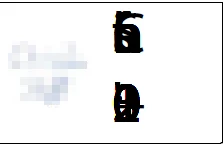
I.m.o. it does not matter how the PDF files has been created. Some are created out of MS Word some are from SAP system. We have also tried different text directions.


Does anyone know this behavior?

If you need more information please let me know.


thanks and best regards,

Christian

This topic has been closed for replies.
Correct answer administratorf52324355

Hello,


i found a solution for us. The signature will be shown correct when the Fonts is embedded in the Source Document.

Here is the how to: Embed fonts in documents or presentations - Office Support (microsoft.com)

You can set the option for the current Document or for every new Document as well. I suggest to activate it for all new Documents.


regards,

Christian


2 replies

Amal.
Community Manager
Community Manager
August 7, 2020

Hi there


We are sorry for the trouble. As described on some documents the digital sigature doesnt work appropriately.


It seems to be a file specifc issue, is this a behavior with the PDF created from Word or from SAP? Also, what is the workflow/steps you are doing to create the PDF?


Would it be possible to share a sample PDF file so we can reproduce the issue on our end and check it.


What is the version of the Adobe Acrobat Reader DC you are using? To check the version go to Help > About Adobe Acrobat Reader DC and make sure you have the latest version 20.009.20074 installed. Go to Help > Check for updates.


We are here for help, just need more information.


Thanks

Amal

administratorf52324355
administratorf52324355AuthorCorrect answer
Participant
January 19, 2021

Hello,


i found a solution for us. The signature will be shown correct when the Fonts is embedded in the Source Document.

Here is the how to: Embed fonts in documents or presentations - Office Support (microsoft.com)

You can set the option for the current Document or for every new Document as well. I suggest to activate it for all new Documents.


regards,

Christian


ninoa97979321
Participant
August 7, 2020

Hello,


did you solve your problem yourself? We have the same problem.


Best regards,

Martin