
marius.cretoiu
Participant
May 4, 2026

Error loading WINHTTP.DLL When I open a PDF file, the error from attached file image is display.
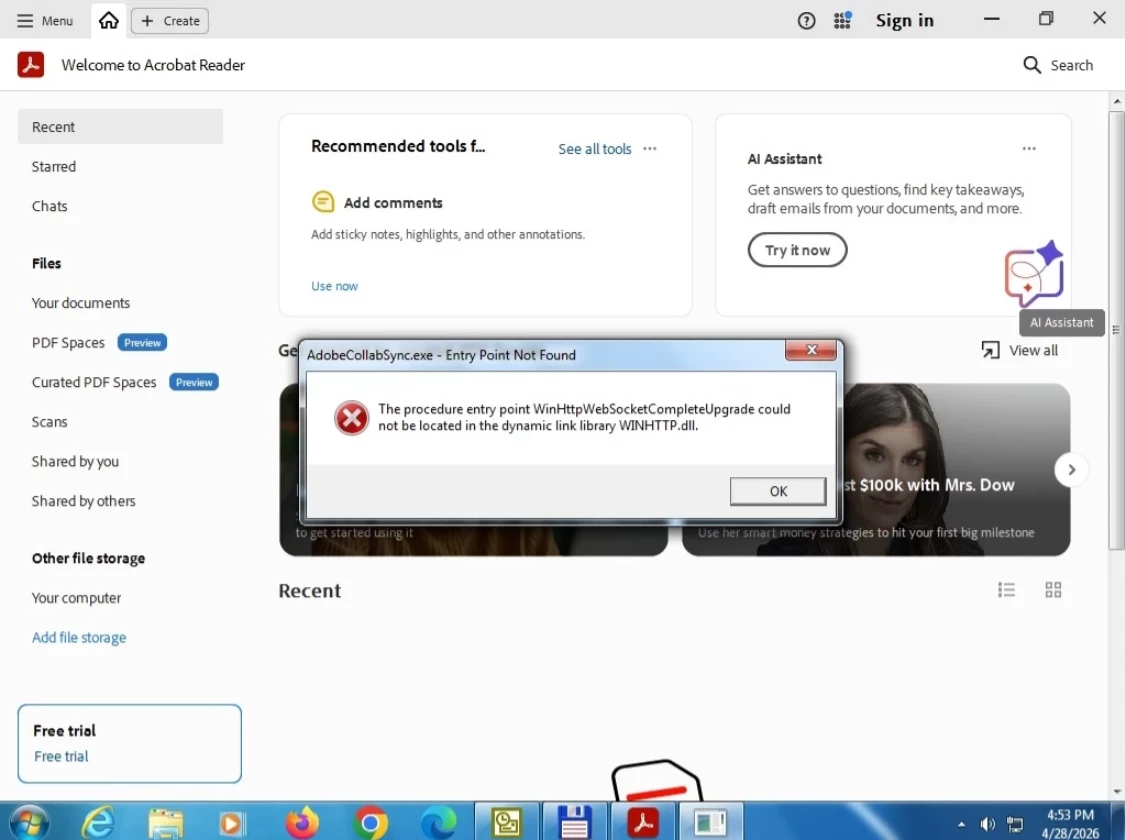
  • May 4, 2026
  • 2 replies
  • 59 views

Error loading WINHTTP.DLL

When I open a PDF file, the error from attached file image is display.

 

    2 replies

    marius.cretoiu
    Participant
    May 5, 2026

    When I open a PDF file, the error from attached file image is display.


    Meenakshi0101
    Community Manager
    Community Manager
    May 5, 2026

    Hi marius.cretoiu,


    It would be helpful if you can share the following:

    • Please confirm the Acrobat Reader version
    • OS version number on the machine.
    • Do you receive the error message for all files?

    We will be waiting for your response.


    Thanks,

    Meenakshi


    marius.cretoiu
    Participant
    May 6, 2026

    Adobe Reader 2026.001.21529

    Windows 7 version 6.1 (Build 7601: Service zpack 1)

    Error is for all pdf file opened.


    Meenakshi0101
    Community Manager
    Community Manager
    May 4, 2026

    Hi marius.cretoiu,


    Thank you for reaching out, and sorry for the trouble caused.


    As mentioned above, the error message appears when you try to open the file in the application. There was a similar issue that was resolved with the March release. Please ensure that the application is updated to the latest version. In the application, go to Menu > Help > Check for updates. You may refer to the following help page to check the latest version available: https://www.adobe.com/devnet-docs/acrobatetk/tools/ReleaseNotesDC/index.html.


    If the issue persists, please confirm whether it occurs when opening the specific PDF. Also, it seems that you are using Windows 7, which is not supported with the latest version of the application. 

    Please confirm the Acrobat Reader and OS version numbers.


    Let us know how it goes.


    Thanks,

    Meenakshi