Participant
Aug 20, 2020 11:17 PM UTC
Answered

Error PPKHandlerImpl-83 and SecurityConsole-430

A popup appears with the error SecurityConsole-430 in Edit --> Preferences --> Firm --> ID and Certificates


If I try to digitally sign, it appears PPKHandlerImpl-83


How can I solve it?


Thanks!

This topic is closed to new replies. Start a new post to keep the conversation going.
Marcin22359925pegcCorrect answer
Participant
Dec 22, 2021 11:06 AM UTC

I Have found a soution:


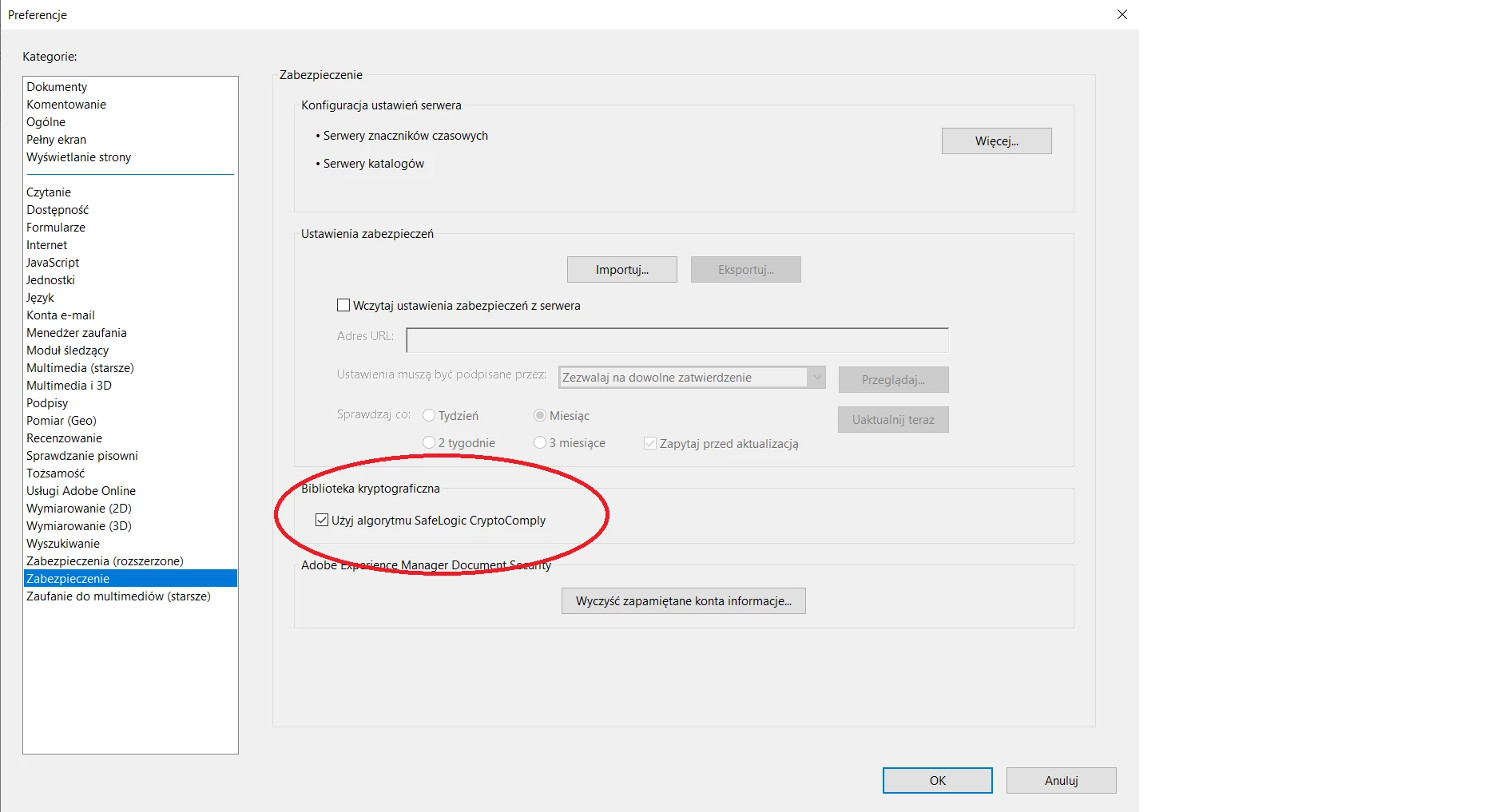
Edit -->  Preferences --> security  --> check the "Use SaveLogic CryptoCompany algorytm" 

🙂


12 replies

Participant
Apr 18, 2023 10:14 PM UTC

I tried to digitally sign a document , but appears a message PPKHandlerImpl-83

Solved by doing this: 

Just copy/paste in an elevated command prompt:

* sfc /scannow

* DISM /online /cleanup-image /restorehealth

Reboot the PC and it works !  

Translate
Marcin22359925pegcCorrect answer
Participant
Dec 22, 2021 11:06 AM UTC

I Have found a soution:


Edit -->  Preferences --> security  --> check the "Use SaveLogic CryptoCompany algorytm" 

🙂


Translate
Participant
May 22, 2022 7:44 PM UTC

No funciona

Translate
Participant
Dec 15, 2021 7:24 PM UTC

I know this original post is over a year old, but I came across this problem today. After running and SFC scan and DISM restorehealth command, it started working correctly. Just adding this here since my initial search didn't find much more than this post and figured others might need help in the future.

Just copy/paste in an elevated command prompt:

> sfc /scannow

> DISM /online /cleanup-image /restorehealth

Translate
Participant
Mar 16, 2021 12:18 PM UTC

I have the same problem, anyone has a solution for this?


Translate
Participating Frequently
Nov 4, 2021 11:44 AM UTC

Verifique se vc está com mais de um certificado digital , se for o caso desinstale um deles ficando só com um .

Desinstale o ADOBE DC e reinstale . 


No meu caso deu certo !!

Translate
Participant
Oct 1, 2020 10:55 AM UTC

Hi, I have the same problem as you all. May I ask if you are using some kind of USB token with certificates? Or are you using a locally stored signing certificate?

Translate
Participant
Oct 1, 2020 11:34 AM UTC

We are using a locally stored certificate

Translate
Participant
Sep 30, 2020 9:43 AM UTC

same here, have you resolved this error

Translate
Participant
Sep 24, 2020 10:25 AM UTC

I have the same issue.
😞

Translate
Participant
Aug 25, 2020 6:48 PM UTC

I'm having the same issue.

Translate