

Participant
September 17, 2021
Answered

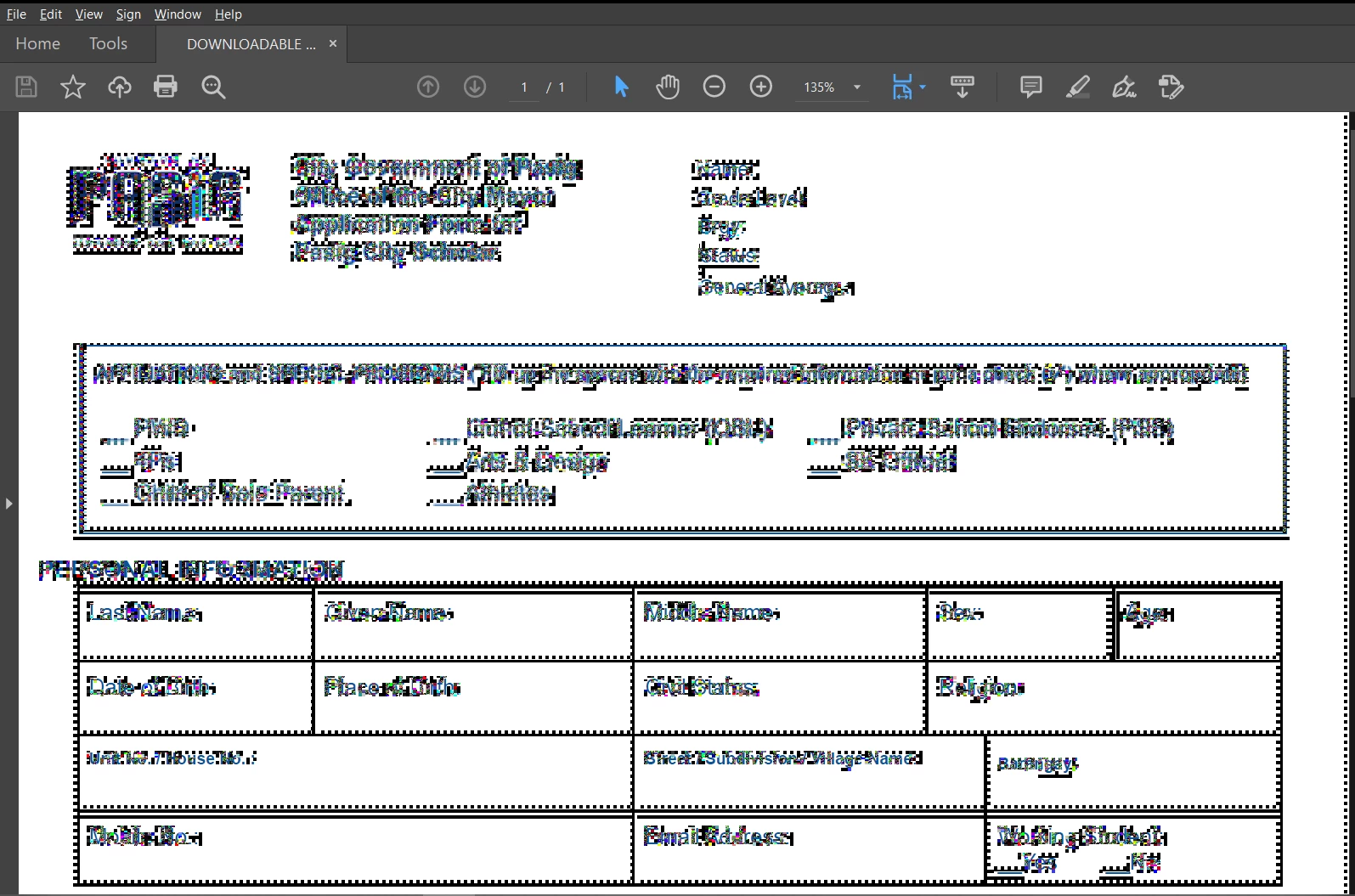
ERROR when trying to input text/signature

  • September 17, 2021
  • 2 replies
  • 386 views

How can I fix this kind of error/bug? I tried reintalling but nothing happened.

This keeps on occuring whenever I try to highlight, add some text and signature. 


This topic is closed to new replies. Start a new post to keep the conversation going.
Correct answer Amal.

Hi there


++ Adding to the discussion


Please try the steps below and see if that works:

Right-click on your Acrobat Reader DC icon on the desktop or navigate to the AcroRd32.exe file in this folder
C:\Program Files (x86)\Adobe\Acrobat Reader DC\Reader

Choose "Troubleshoot Compatibility." Tell the troubleshooter to run this program in Windows 7 compatability mode.


For more information please check the correct answer marked in the similar discussion https://community.adobe.com/t5/acrobat-reader-discussions/screen-turns-to-black-and-white-dots-using-adobe-acrobat-reader-dc-19-21-20049/m-p/11011752/page/2#M64473


Hope it will help


Regards

Amal

2 replies

Amal.
Amal.Correct answer
Legend
September 17, 2021

Hi there


++ Adding to the discussion


Please try the steps below and see if that works:

Right-click on your Acrobat Reader DC icon on the desktop or navigate to the AcroRd32.exe file in this folder
C:\Program Files (x86)\Adobe\Acrobat Reader DC\Reader

Choose "Troubleshoot Compatibility." Tell the troubleshooter to run this program in Windows 7 compatability mode.


For more information please check the correct answer marked in the similar discussion https://community.adobe.com/t5/acrobat-reader-discussions/screen-turns-to-black-and-white-dots-using-adobe-acrobat-reader-dc-19-21-20049/m-p/11011752/page/2#M64473


Hope it will help


Regards

Amal

Meenakshi_Negi
Legend
September 17, 2021

Hi Hashgraph,


Thank you for reaching out and sorry for the trouble.


Try once to repair the application installation and reboot the machine. Check if the issue persists.

Could you please share your Acrobat and OS version on the machine?

Did you make any recent changes after which the issue started occuring?

Please check if the issue occurs with all the files that you open in the application.


Thanks,

Meenakshi
