
Participant
January 6, 2020
Question

Error When Trying to Share Files in Acrobat Reader DC on Mac

  • January 6, 2020
  • 1 reply
  • 1188 views

When I try to share a file for viewing in Acrobat Reader DC, it tries and tries to send but then I get this error:
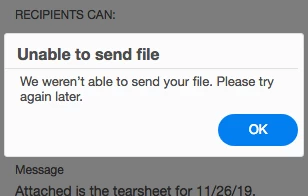
I've tried closing out of the program and going back in and I've tried different email addresses that I know receive mail so it's not a bad email address. Any other suggestions?

This topic has been closed for replies.

1 reply

Amal.
Legend
January 8, 2020

Hi Mpurdy


We are sorry for the trouble. As described above you are not able to send the files in Adobe Acrobat Reader DC and getting the error 'Unable to send file'


What is the version of the Adobe Acrobat Reader DC installed? To check the version of the application please use the link: https://helpx.adobe.com/acrobat/kb/identify-product-version.html
Make sure you have the latest version 19.21.20061 installed. Go to Help > Check for Updates and see if that works for you.


Also, you may please refer to the steps provided in the help article: https://helpx.adobe.com/acrobat/kb/send-email-attachment.html


Let us know how it goes


Regards

Amal