
albmis
Participant
February 13, 2019
Question

errors when opening a PDF in outlook 2016 on a VDI

  • February 13, 2019
  • 1 reply
  • 2302 views

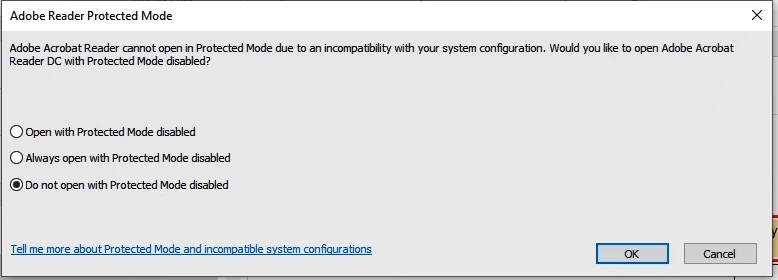
looking for help from someone. we are using Adobe Acrobat Reader (whatever the latest version is) on a VDI. the issue is every time we run an update the next morning the end user, when trying to open a PDF from inside their Outlook (we are on o365), they get the first error, saying that Acrobat cannot open the file in Protected Mode due to incompatibility. you click to tell it to open with protected mode disabled and 
You get the next error "Acrobat failed to load its Core DLL"
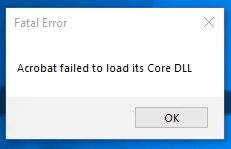
you click OKAY and adobe reader closes. the only way to open the pdf is to download it and open it. the preview function works fine though, just trying to open it (from outlook) and only if you are on a VDI.

    This topic has been closed for replies.

    1 reply

    AnandSri
    Legend
    February 13, 2019

    Hello Villanuevap,

    We're sorry for the trouble you had, what is the version of Adobe Reader DC installed? To identify, please refer to Identify the product and its version for Acrobat and Reader DC

    Try the suggestion from the following help article and share your observation Protected Mode troubleshooting | Adobe Reader

    Thanks,

    Anand Sri.

    albmis
    albmisAuthor
    Participant
    February 14, 2019

    Hello Anand, version is 2019.0.10.20091

    There is no “Enable Protected Mode at startup” under general but found it in the security

    I disabled protected mode on start up and am still getting the message/error. Since these are virtuals, they do not have Antivirus on them so that isn’t part of the issue we are having. We do not have smart cards installed on these computers, so that isn’t a problem. We do not have flash on these VDI comptuers, they are windows 19, build 1809. Opening PDF’s on regular computers, work fine. This is only occurring on the VDIs

    AnandSri
    Legend
    February 14, 2019

    Hello Villanuevap,

    Thank you for sharing the details and sorry for the trouble, we will share the details with the Engineering team for further investigation and will share an update as soon as possible.

    Thanks for your time and patience.

    Regards,

    Anand Sri.