Answered
Excel to PDF
Hi All,
I have recently upgraded to office 365 mac... however when i now try and save as a PDF it saves over multiple pages... which it did not do before.
do i have to change a setting in excel or Adobe Reader ?

Hi All,
I have recently upgraded to office 365 mac... however when i now try and save as a PDF it saves over multiple pages... which it did not do before.
do i have to change a setting in excel or Adobe Reader ?
Hi Ryan C,
Sorry for the delay in response.
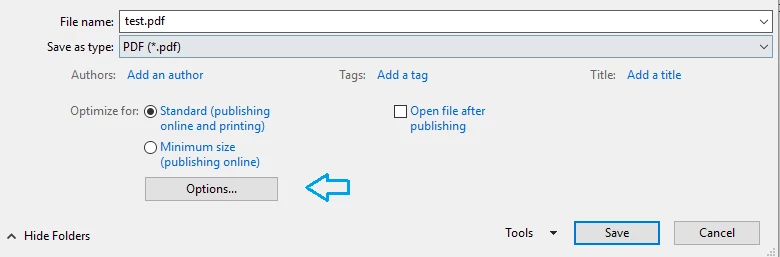
Would you mind letting us know the steps you are taking to convert an excel file to pdf? Are you using File > Save as .. > pdf option, if yes, you may try changing settings by clicking 'Options' when pdf is selected under 'Save as type' under Save As dialogue box.
Below is the screenshot:
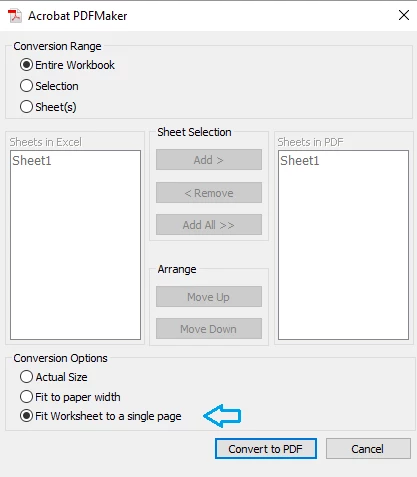
If using Save as Adobe PDF option, try changing 'conversion options' to 'fit worksheet to a single page' and try converting to pdf again.
Would you mind confirming the application you have on the machine - is it Adobe Reader/ Adobe Acrobat as Save as Adobe PDF option would be available when you Adobe Acrobat installed on the machine.
Thanks,
Shivam
Already have an account? Login
No account yet? Create an account
Enter your E-mail address. We'll send you an e-mail with instructions to reset your password.


 AdChoices