Participant
May 8, 2018
Answered

Export Files error

  • May 8, 2018
  • 1 reply
  • 829 views

Hello,

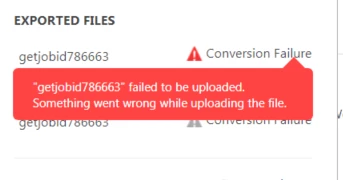
I want to export a file to Word or Excel but when i do i get a error: ( Something went wrong while updating the file. )

I have updated it but it still gave me the error.

Error;
This topic has been closed for replies.
Correct answer Meenakshi_Negi

Hi Krinkels,

Sorry for the delay in response.

I have checked your account and it is in suspended mode.

That seems to be the issue you are not able to export PDFs.

As it is a billing issue, you need to contact support directly to get this checked.

Open this link Contact Customer Care and sign-in with your Adobe ID and Password.

Then select the "Account issues" from the options available.

Let us know if you need any help.

Regards,

Meenakshi

1 reply

Meenakshi_Negi
Legend
May 8, 2018

Hi Krinkels,

As you experience an issue when exporting PDF, did you check if the issue occurs with this particular file?

Try once to export file online here https://cloud.acrobat.com/

Open the link and sign in with your Adobe ID and password. Then go to Export PDF.

Check if the file exports without any issue.

Also, try to export some alternate file and check if it works fine.

Make sure that the file size is up to 100 MB, not more than that.

Let us know how it goes.

We will be waiting for your response.

Regards,

Meenakshi

Participant
May 9, 2018

Hi,

I have tried to export more than this particular file and that dind't work too.

The file i am trying to export is a PDF file of 400 KB that should be good right?

The other solution on https://cloud.acrobat.com/​ did not work either.

I think while uploading the file something blocks it but i know now what.

Maybe someone can help me further?

Regards,

Krinkels ICT

Meenakshi_Negi
Meenakshi_NegiCorrect answer
Legend
May 16, 2018

Hi Krinkels,

Sorry for the delay in response.

I have checked your account and it is in suspended mode.

That seems to be the issue you are not able to export PDFs.

As it is a billing issue, you need to contact support directly to get this checked.

Open this link Contact Customer Care and sign-in with your Adobe ID and Password.

Then select the "Account issues" from the options available.

Let us know if you need any help.

Regards,

Meenakshi
