

geregl67
Participant
March 2, 2026
Question

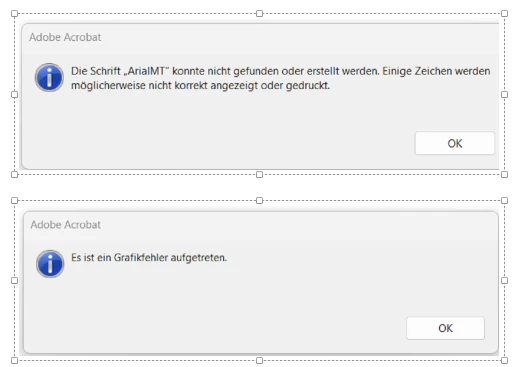
Fehler in Adobe Acrobat 25, Es ist ein Grafikfehler aufgetreten und ArialMT fehlt

  • March 2, 2026
  • 1 reply
  • 116 views

Beim Öffnen mancher PDFs, meist extern, kommen die Fehlermeldungen Grafikfehler bzw. ArialMT Schriftart fehlt. Wie kann ich das als Admin bei meinen Usern beheben?
 

    1 reply

    AnandSri
    Community Manager
    Community Manager
    March 2, 2026

    Hello ​@geregl67 


    I hope you are doing well, and thank you for reaching out. We’re sorry for the trouble you had.


    The error “Es ist ein Grafikfehler aufgetreten”, combined with the missing “ArialMT”, occurs when a PDF references a font that is not embedded in the file. Acrobat follows the PDF specification strictly and fails to render content when required fonts are missing or incorrectly embedded.


    Please check the PDF properties once from the Menu > Document Properties > Fonts > and check for missing fonts. 

    • Install the Arial font family on your operating system.

    • Restart Acrobat and reopen the PDF.

    • Please ensure you have the latest version of Acrobat installed on the machine: Version: 25.001.21223 Planned update. Feb 17, 2026. Check for any pending updates by navigating to Menu > Help> Check for Updates. Install the updates, restart the app and the machine, and try again.

    Try recreating the PDF file using the source application, and ensure all fonts are embedded during export. See this article for more information: https://helpx.adobe.com/in/acrobat/desktop/create-documents/explore-advanced-conversion-settings/font-handling-distiller.html


    Is it happening with all the PDFs, or with a specific set of PDFs? Are you on a Mac or Windows machine, and what is the version?


    Please let us know how it goes after trying the steps.

    Regards,

    Anand Sri.