
Fill and Sign dual font when Czech language is used
Hi,
I have the latest Acrobat Reader DC.
When I want to use Fill & Sign tool and fill in text, everything is shown as Sans-Serif. When I switch back to "Reader view", some filled text is viewed as Sans-Serif typeface (all texts with "standart characters") and some as Serif type face (text with special Czech letters like "ř" or "ě").
When I save the filled PDF open it in Libre Office Draw, the previous Serif typeface is named as "MinionProular" (the text with letter "ř" or "ě"). The Sans-Serif typeface is named as "Arial" and the monospace font is named as "CourierStd".
Is there any way to contact developers or Adobe company to fix this mess? (See the picture below)
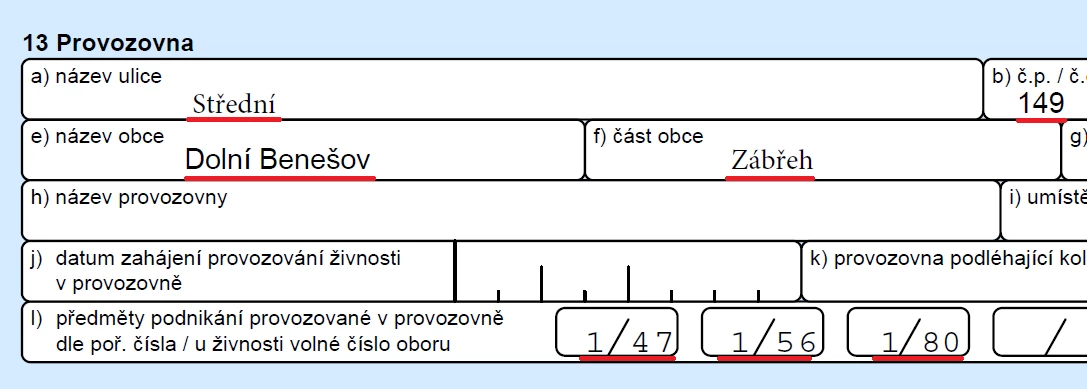
PS: What the f*ck is MinionProular or CourierStd font? There are Arial(Calibri) and Courier (New) fonts which are sufficient for 90 % of population (and Times New Roman)! When you want to use non-standard fonts, make sure you use those with UTF-8 !!!
 AdChoices