
Participant
March 22, 2019
Question

Fill and sign unknown error

  • March 22, 2019
  • 2 replies
  • 1067 views

Hi!

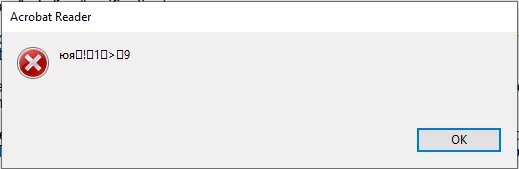
So, I created a PDF document in LibreOffice. Then I opened it in Adobe Acrobat Reader DC, went to Fill and Sign, created my signature, but when I try to sign the document I get the error you can see on the picture. I also tried to make a field in order to put a signature there - same error. Please help. Windows 10.

Tried it also on Mac - works fine.
    This topic is closed to new replies. Start a new post to keep the conversation going.

    2 replies

    Meenakshi_Negi
    Legend
    March 22, 2019

    Hi Bасилийо,

    You have mentioned that the document was created via the LibreOffice.

    Please check if you get the error message on this particular PDF. As the PDF was created with Adobe PDF maker, not sure what exactly creating the issue.

    Would it be possible to share the original document with us? You may share it in a private message if you do not share it on a public forum. Refer to the steps provided here How Do I Send Private Message

    To share the file, you may use the steps mentioned here How to share a file using Adobe Document Cloud

    Also, you have mentioned that on mac it works fine. Do you add a signature using the Adobe Acrobat Reader DC application on Mac?

    We will be waiting for your response.

    Regards,

    Meenakshi

    Participant
    March 25, 2019

    Hi Meenakshi,

    Thank you for your reply. Unfortunately, I can share the document neither on the forum nor in a private message since it's under NDA.

    I get this error message only on Windows using Adobe Acrobat Reader, including the original document. Is there any way to resolve this without sharing a document? Or I can create another one with a random text and if the error remains, send it to you. Would that be ok?

    As for Mac, I opened it in Preview.