Inspiring
September 24, 2018
Answered

Fill In PDF field length

  • September 24, 2018
  • 1 reply
  • 1001 views

This may be a ColdFusion question, but I'll start here.

I am trying to do a mail merge using CF <cfpdfform tag.

I have a query with 100 records that loops through the PDF with these form fields.
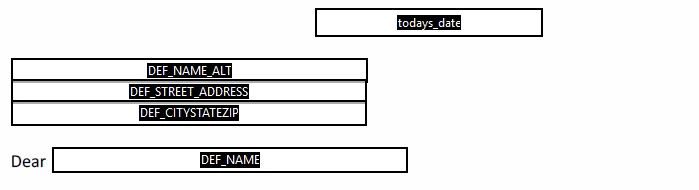
My query loops through and adds/inserts the query values to each PDF and creates 100 pdf's with the filled in values.

Because i don't need to worry about the length of any of these values, It works great.

But here is where I have my issue

When the query value is within a sentence I don't know how large to make the text field on my blank fill in PDF

When the city name is Ida the field needs to be a certain width and when the city name is Oklahoma City it needs to be a much larger width..

Is there a way to deal with this?

ShouldI be using a different way to merge query data with these PDFs?

This topic has been closed for replies.
Correct answer try67

The formatting options are very limited. You'll need to adjust it manually to get to appear correctly.

1 reply

try67
Community Expert
Community Expert
September 25, 2018

The only way to deal with it in a PDF file is if the entire sentence is a part of the same text field. Then it will adjust it correctly to fit the text. Otherwise you can only adjust the font size, which will look odd.

weezerboyAuthor
Inspiring
September 25, 2018

I tried this but the leading or line-height for the fill-in sentence was different than the rest of my letter. Is there a way to set the height of the form field in the hopes that the leading or line-height will be increased?

try67
Community Expert
try67Community ExpertCorrect answer
Community Expert
September 25, 2018

The formatting options are very limited. You'll need to adjust it manually to get to appear correctly.