

grecco93
Participant
February 2, 2026
Question

font "ArialMT" cannot be found

  • February 2, 2026
  • 4 replies
  • 431 views

Hello everyone,

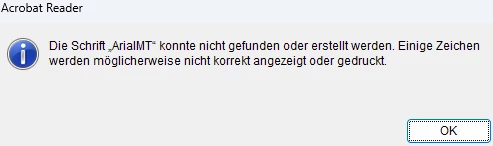
for the past few weeks (possibly since the January Windows Update), we have been getting the following error message randomly when opening different PDFs:

'The font ArialMT cannot be found or created'.

It doesn't matter whether the PDF file is being opened on a network share or locally.

Once the user clicks 'OK', the error disappears after reopening the same file.

  • Affected users so far: 50
  • Windows 11 Pro 24H2 (26100.7623)
  • Adobe Acrobat Reader Version 2025.001.21111 Continous Release

Any help would be appreciate


Message displayed (german)
 

    4 replies

    A14049752
    Participant
    February 5, 2026

    Go to 
    HKEY_LOCAL_MACHINE\SOFTWARE\Microsoft\Windows NT\CurrentVersion\FontSubstitutes
    Add a key called “ArialMT” and the value “Arial”

    mszongott
    Participant
    February 4, 2026

    We have same issue for same version (2025.0001.21111). Since January 2026. Can you please provide an update to solve it?

    thomasholde
    Participant
    February 3, 2026

    We have the same issue on some computers. The users only get this error with some PDF files. On my own computer I’m unable produce the error. The PDF’s that cause the error for some users works for other users.

    We are all using version 2025.001.21111.

    It also looks like an old issue although the possible solution is now longer an option under Settings:

    ArialMT font missing | Community

    dariusz.phone
    Participant
    February 3, 2026
    I have the same problem. But it doesn't occur on all Windows 25H2 workstations.