
Participant
January 23, 2025
Question

Font rendering issue in Adobe reader

  • January 23, 2025
  • 1 reply
  • 611 views

As stated in the title, Adobe Reader renders letter differently depending on the zoom applied to the document.
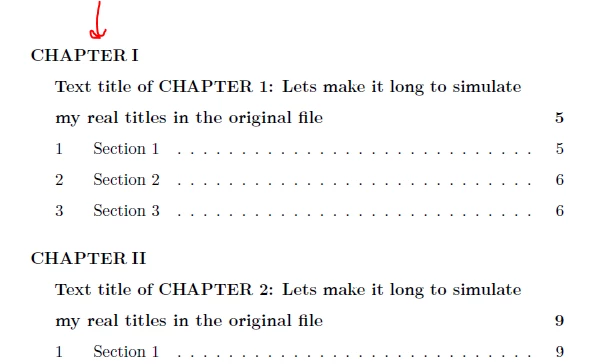

In the picture, you can see how at 100%, some the E and T letter are shorter than the rest.
If I zoom in this problem dissappears.
The pdf in question is produced by LaTeX, and this behaviour is not present in any other PDF viewer that I've tried.

It's a shame that one of the most powerful tools for typsetting documents crashes with one of the most used PDF viewers...

I have attached an example pdf, I hope Adobe engineers consider solving this in the future 🙂

Thanks

1 reply

AnandSri
Legend
February 28, 2025

Hello,


I hope you're doing well, and we apologize for the delayed response and the trouble.


Please ensure you have the latest version of Acrobat installed on the machine: 24.005.20421 Optional update, Feb 24, 2025. Check for any pending updates from the Menu > help > check for updates, install the updates, restart the app and the machine, and check. For more information, see this: https://adobe.ly/4kyn6eP.


Please try the following steps:

Disable "Use Local Fonts":

Check Font Embedding:

  • Ensure the fonts are properly embedded in the PDF. Refer to this Adobe help article for more details. If the fonts were not properly embedded when the PDF was created, the app may not display them correctly. If possible, recreate the file with properly embedded fonts. If you have Acrobat, use the Preflight tool to check the PDF font issues, and fix it.

I hope this helps.

Thanks,

Anand Sri.