


Form actions and functions with javascripting not performing same on users end?
Does anyone know why certain actions I have javascripts for aren't performing the same on the users end when I email them the a fillable form I created?
I have a dropdown ("Vehicle Model") that will filter only specific options to select because its conditional upon what is selected in a previous dropdown (Vehicle Make). However a user emailed me that when they selected a vehicle make, that when they clicked the arrow for the second dropdown to select the vehicle model specific to that make it didn't populate any options to select other that the default "-Select Model-".
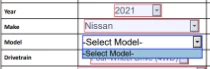
I thought maybe was an error on my side in the scripting, but when I open and test the form on my end it works completely fine.
Another example, is that I have a lot of fields hidden with javascripts that should only become visible if certain check boxes are checked, but when the client downloads the PDF I sent them by email, it is by default revealing all the fields that I set to be by default hidden fields unless those boxes were checked.
Is the reason for the error is because of me adding the javascripting? Is there a setting that needs to be checked in order for the scripting actions to perform on the form on the users end?
Does it matter the size of the file why this happens? As currently my PDF form file size when attached to an email is about 5-6 MB in size.
If helpful I should also add that the issue seems to be global for who I sent the form to. Those users who reported the issue to me used various mediums to open the file such as iphone, ipad, Macs, and Windows cpus, but all 5 people I sent form said they experienced same issue.
Appreciate any help community can offer to fix. Thanks!
 AdChoices