

Form fields doubling after being emailed and digitally signed in reader
Good Afternoon,
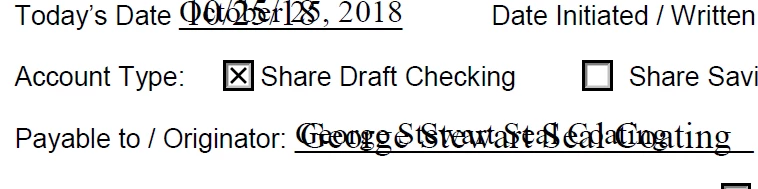
Recently (since the latest update for Reader), the locked form field text is being doubled (or written over top with a new value) when emailed to a customer for their digital signature and then emailed back. I have edited a returned form and there is only one instance of the form field, so it's not like the text box was somehow corrupted and doubled. We have sent these forms to members over the past year and have only had this issue since the latest adobe update. Below is an example of how the fields look when they are returned (emailed back) to us. The original text (all forms are LOCKED before being sent, so NO fields can be edited) is in the background with new text in the foreground. In the case of the date, it is completely different formatting (original formatting is MM/DD/YYYY. New value shows October 25, 2018). How can this possibly happen on a form that has been locked to disable editing of fillable fields? Below is an example of what is happening. Any help is appreciated. Thank you!


 AdChoices