


Participant
March 13, 2018
Answered

Form Prints with all Radio boxes Ticked >

  • March 13, 2018
  • 7 replies
  • 4185 views

Hi,

I've created a fillable form with radio boxes and tick boxes that all works fine until I go to print as it prints out with all the radio boxes filled in.

I have checked on several machines and versions and they all print with all radio boxes filled in.

I've tried printing as image but still does the same.

The pdf when open...
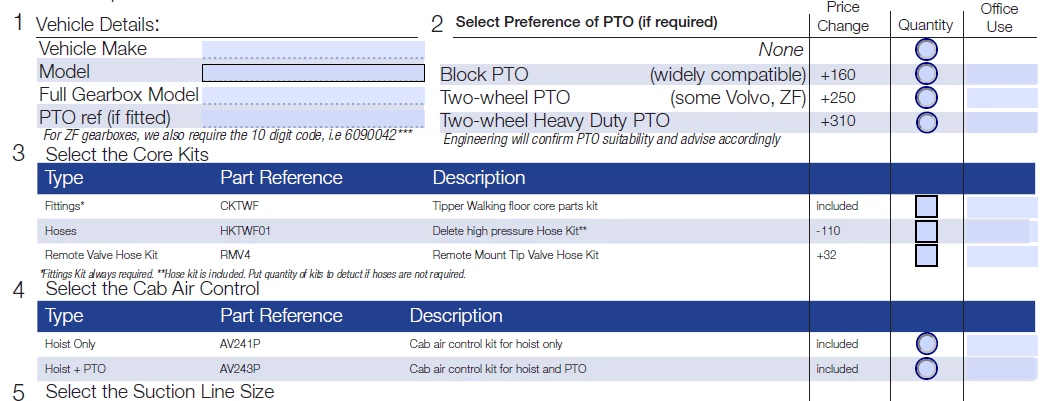
But when I go to print, they are all filled in. Ive tried all options in comments in forms that don't do anything except the last one form fields only which just creates a full white page.
Any help, much appreciated

many thanks

This topic is closed to new replies. Start a new post to keep the conversation going.
Correct answer jost ukl55069910

Hi Meenakshi,

many thanks for your reply.

it is adobe acrobat Pro DC

Version : 2018.011.20038

Please find below file:

Shared Files - Acrobat.com

again many thanks for your help, much appreciated


Hi Meenakshi,

I found When I print out my PDF fillable form, all of the check boxes and radio boxes appear filled/checked.

My apologies, i searched yesterday and didnt see anything but just found this which was exactly my problem.

Thanks again for all your help

kind regards

7 replies

Participant
November 12, 2020

The link to the answer is broken.  What is the answer?  I'm having the same issue.

Participant
November 12, 2020

Resolved:  In Properties - Borders and Colors - Fill Color should be set to NO COLOR.

Participant
March 14, 2018

one day bump...

Meenakshi_Negi
Legend
March 14, 2018

Hi Jostukl,

As you have mentioned above, when you print the PDF form it automatically selects all the radio buttons.

Could you please let us know how exactly you have created the PDF from?

Let us know the exact version of Adobe application you are using the create and print the form? Use the steps mentioned here Identify the product and its version for Acrobat and Reader DC to check the version.

Can you share the original form with us, so we can check it at our end?

If you can share, please take help of the steps mention here How to share a file using Adobe Document Cloud

We will try to replicate the same at our and check the root cause of the issue.

We will be waiting for your response.

Regards,

Meenakshi

Participant
March 14, 2018

Hi Meenakshi,

many thanks for your reply.

it is adobe acrobat Pro DC

Version : 2018.011.20038

Please find below file:

Shared Files - Acrobat.com

again many thanks for your help, much appreciated