



Garbled characters / wrong font displayed
Hi
One user at a client have this strange issue. Some PDFs are displayed like this:
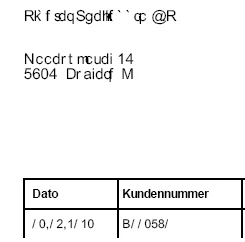
Only some PDFs, what they have in common is that they are created by Axapta (Microsoft Dynamics AX). I can see that in meta data.
Other users on same server, don't have this issue with the same files. And this user don't have the issue every day.
Looks like this old issue:
https://www.enavate.com/blog/my-pdf-is-unreadable-scott-brubaker
https://superuser.com/questions/1278576/arial-font-showing-up-garbled-on-acrobat-dc-on-windows-10-pc
https://community.adobe.com/t5/acrobat/scrambled-text-when-viewing-pdf-documents-in-acrobat-standard-xi/td-p/9521671
But nothing I have tried fixed it.
I have deleted all Adobe folders in users appdata.
I've seen the issue correct itself after the PDF was open for a few seconds, the correct text was displayed.
When I mark the text and copy to word, it's displayed the same way with a font with a strange name like 32@sd.tmp If I copy in plain text it's correct.
So I think the issue is that Adobe Reader cannot always display this PDF with the correct font.
But is that something I can fix?
I don't have access to the Axapta system.
Windows: Server 2016
Adobe Reader version: 2021.001.20142
/Kim
 AdChoices