


Participating Frequently
Aug 16, 2024 2:14 AM UTC
Answered

Got problems after updating to 2024.002.20259 version

Hi~im newbie here

I got some problems while opening PDF files after updating to 2024.002.20259 ~ 

The formatting of the file's content is disorganized.
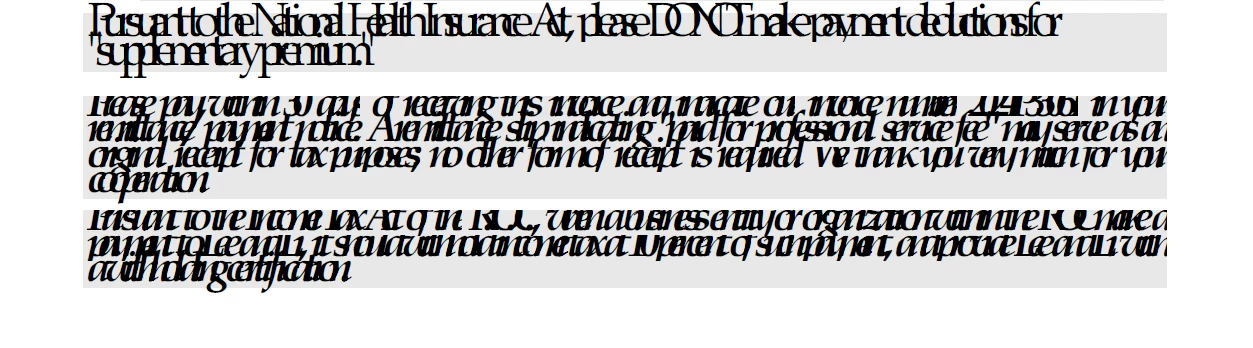
It looks like the fonts got some issue and i googled this to find out the solution~~But no luck~~

Has anyone else had this issue too?

Big Thanks~

This topic is closed to new replies. Start a new post to keep the conversation going.
AnandSri
AnandSriCorrect answer
Legend
Aug 27, 2024 3:44 PM UTC

Hi All!


The fix is available with the latest release of Acrobat version 24.003.20054.

Please install the update from the Help menu of Acrobat, install the update, restart the application, and check.


Let us know if you experience any issues.


Thanks,

Anand Sri.

30 replies

AnandSri
AnandSriCorrect answer
Legend
Aug 27, 2024 3:44 PM UTC

Hi All!


The fix is available with the latest release of Acrobat version 24.003.20054.

Please install the update from the Help menu of Acrobat, install the update, restart the application, and check.


Let us know if you experience any issues.


Thanks,

Anand Sri.

Translate
Participant
Aug 27, 2024 3:55 PM UTC

Hi,


it's OK with the new version.

Thanks,

Stéphane

Translate
AnandSri
Legend
Aug 27, 2024 4:12 PM UTC

Thank you for the confirmation and your cooperation. 


~Anand Sri.

Translate
PoorITmanAuthor
Participating Frequently
Aug 21, 2024 9:43 AM UTC

It seems will be fixed in upcoming update ~

Translate
gpocta
Participant
Aug 21, 2024 3:46 PM UTC

That's great news! Did you hear that directly from Adobe support?

Translate
PoorITmanAuthor
Participating Frequently
Aug 22, 2024 1:10 AM UTC

if you dont mind ~ check the link below ,basicly~it's the same problem~

https://community.adobe.com/t5/acrobat-reader-discussions/pdfs-opening-in-gibberish-in-version-2024-002-21005/td-p/14803103 


Translate
Participant
Aug 20, 2024 8:35 AM UTC

The same problem !!!

Translate
Participant
Aug 20, 2024 9:59 AM UTC

Same problem. But will Adobe release an update that corrects the problem? 

Translate
Participant
Aug 20, 2024 8:23 AM UTC

Hi - From Belgium.
We encounter the same problem with an application that use "ISA PDF printer" as pdf generator.
A version of this soft : BioPdf Writer -  https://www.biopdf.com/download.php
I don’t know if there is a connection with the situations of other people who are experiencing the problem.

No problem with other pdf viewers like web browsers, Foxit PDF, ...

In advance, thanks for help !

Translate
Participant
Aug 20, 2024 8:29 AM UTC

yes, exactly the same pdf Generator ISA PDF Printer.

And no problems with the other pdf viewers.

Translate
Participant
Aug 20, 2024 8:10 AM UTC

I encounterred the same problem.

Translate
Participant
Aug 16, 2024 6:41 PM UTC

Hello, i have some issues with displaying fonts in Acrobat Reader. It seems that program automatically enlarge font size and make the text unreadable. At the same time there are some paragraphs that didn't affected. The program works normally few days ago (or maybe a week, i don't remember) with the same files, but now it affects all pdf files (files are ok when I open them using browser). 

I tried to reinstall the program two times in different languages and it didn't work and i couldn't find the resolution in the internet... Maybe anybody have an idea how to fix it?

Translate
Participant
Aug 16, 2024 7:06 PM UTC

I am also seeing font display issues in Adobe Reader impacting multiple PDF since the latest release 2024.002.21005 was installed. See attached images showing the differences between version 2024.002.20991, the previous release where the font is correctly rendered, and the latest version.


[PII removed by moderator]

Translate
Participating Frequently
Aug 17, 2024 12:00 PM UTC

The actual version of the Adobe Reader has problems to display "outline fonts" - if you use Ghostscript you have to change the settings of the converter.


This is a bug of the actual Reader version becase it worked since 20 years without problems, and also with all other PDF Readers from other vendors, or with browsers.


But till now, i think Adobe does not realize this problem because there are multiple posts about this topic.

Translate
Participant
Aug 16, 2024 2:33 AM UTC

The same problem !!

Translate
Adobe Employee
Aug 16, 2024 8:38 AM UTC

Can we please get a sample PDF where this issue is observed ?

Translate
Participant
Aug 16, 2024 9:38 AM UTC

This PDF file generated from our tests,and it opens correctly with other pdf software or browsers.

Translate
Participant
Aug 16, 2024 2:31 AM UTC
I also encountered the same situation,Adobe Acrobat  Reader version 2024.002.21005。
Translate
Participant
Aug 19, 2024 6:40 AM UTC

Same issue here, it appeared with the latest Update/Version 2024.002.21005.


Translate