
Participating Frequently
July 2, 2022
Question

Gray box next to cursor

  • July 2, 2022
  • 3 replies
  • 1277 views

Hello,
I was using Adobe Reader for editing some documents, then I press something on my keyboard and a strange gray box started showing next to my cursor. Now it changes to edit mode every time I get close to any text box or drawing, so it's pretty hard to move things. 
What key do I need to press in order to make it dissapperar? 
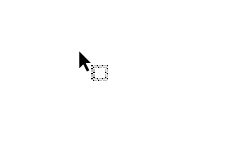
Thanks

This topic has been closed for replies.

3 replies

JR Boulay
Community Expert
Community Expert
July 11, 2022

MOVED TO THE ACROBAT READER FORUM

Acrobate du PDF, InDesigner et Photoshopographe
Bernd Alheit
Community Expert
Community Expert
July 2, 2022

This is the cursor of the selection tool.

Participating Frequently
July 10, 2022

I'm sorry, but if I use another computer and click on the selection tool it looks like this.

There's no gray box next to it.

ls_rbls
Community Expert
Community Expert
July 2, 2022

Would you mind sharing the exact version of your Acrobat?


Did you meant to say Adobe Acrobat Pro?


I don't know that you can editna PDF with Adobe Reader, but you may want to check in Edit, Preferences, Accessibility.


It is possible that a mouse gesture or keyboard combination gesture was activated with something you did.


Does hitting the escape key do anything?

Participating Frequently
July 10, 2022

Yeah, sorry, I mean to say Adobe Acrobat.
That's my version.
Yea, I might activate something by accident, but I can't undo the change. 
The only thing I haven't try is unistall it and install it again