

Question
Group Policy Settings not applying to Internet Explorer Emedded Adobe Reader
Hi,
We're trying to configure some policies to prevent the pop-up box that appears when opening links inside a PDF file, see image:
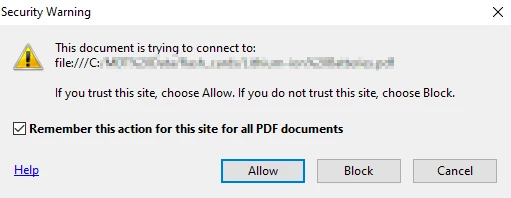
We've achieved this by setting registry values to disable `Preferences > Security (Enhanced) > Enable Protected Mode at startup` and adding the local file path to the list of Trusted sites also inside Security (Enchanced):
Windows Registry Editor Version 5.00

[HKEY_LOCAL_MACHINE\Software\Adobe\Acrobat Reader\DC\Privileged]
"bEnableProtectedModeAppContainer"=dword:00000000
"bProtectedMode"=dword:00000000

[HKEY_LOCAL_MACHINE\Software\Adobe\Acrobat Reader\DC\TrustManager\cTrustedFolders]

[HKEY_LOCAL_MACHINE\Software\Adobe\Acrobat Reader\DC\TrustManager\cTrustedFolders\cAlwaysTrustedForJavaScript]
"t9"="c:\\<Local File Path>"

[HKEY_LOCAL_MACHINE\Software\Adobe\Acrobat Reader\DC\TrustManager\cTrustedFolders\cCrossdomain]
"t3"="c:\\<Local File Path>"

[HKEY_LOCAL_MACHINE\Software\Adobe\Acrobat Reader\DC\TrustManager\cTrustedFolders\cDataInjection]
"t7"="c:\\<Local File Path>"

[HKEY_LOCAL_MACHINE\Software\Adobe\Acrobat Reader\DC\TrustManager\cTrustedFolders\cExternalStream]
"t4"="c:\\<Local File Path>"

[HKEY_LOCAL_MACHINE\Software\Adobe\Acrobat Reader\DC\TrustManager\cTrustedFolders\cFileAttachment]
"t12"="c:\\<Local File Path>"

[HKEY_LOCAL_MACHINE\Software\Adobe\Acrobat Reader\DC\TrustManager\cTrustedFolders\cJavaScript]
"t5"="c:\\<Local File Path>"

[HKEY_LOCAL_MACHINE\Software\Adobe\Acrobat Reader\DC\TrustManager\cTrustedFolders\cJavaScriptURL]
"t10"="c:\\<Local File Path>"

[HKEY_LOCAL_MACHINE\Software\Adobe\Acrobat Reader\DC\TrustManager\cTrustedFolders\cMultiMedia]
"t11"="c:\\<Local File Path>"

[HKEY_LOCAL_MACHINE\Software\Adobe\Acrobat Reader\DC\TrustManager\cTrustedFolders\cScriptInjection]
"t6"="c:\\<Local File Path>"

[HKEY_LOCAL_MACHINE\Software\Adobe\Acrobat Reader\DC\TrustManager\cTrustedFolders\cSilentPrint]
"t1"="c:\\<Local File Path>"

[HKEY_LOCAL_MACHINE\Software\Adobe\Acrobat Reader\DC\TrustManager\cTrustedFolders\cTrustedAuxDownload]
"t14"="c:\\<Local File Path>"

[HKEY_LOCAL_MACHINE\Software\Adobe\Acrobat Reader\DC\TrustManager\cTrustedFolders\cTrustedFor3D]
"t15"="c:\\<Local File Path>"

[HKEY_LOCAL_MACHINE\Software\Adobe\Acrobat Reader\DC\TrustManager\cTrustedFolders\cTrustedForPV]
"t13"="c:\\<Local File Path>"

[HKEY_LOCAL_MACHINE\Software\Adobe\Acrobat Reader\DC\TrustManager\cTrustedFolders\cUnsafeJavaScript]
"t8"="c:\\<Local File Path>"

[HKEY_LOCAL_MACHINE\Software\Adobe\Acrobat Reader\DC\TrustManager\cTrustedFolders\cWeblink]
"t2"="c:\\<Local File Path>"
This works great if I open the PDF file normally within Adobe Reader DC, however our application is opening the PDF files inside an Embedded Internet Explorer window which is then opening the embedded Adobe Reader DC and this is still giving me the security message, how can I make the embedded Adobe Reader use my registry settings?
Thanks


 AdChoices