
Participant
November 29, 2018
Answered

Has anyone met the problem that keyword search function doesn't work?

  • November 29, 2018
  • 1 reply
  • 535 views

After upgrade to Mojave 10.14, I cannot search the keyword in the document. Event the search frame doesn't disappear but Acrobat Reader will not give any reaction.

Could you please tell me how to fix it? Thx : )
This topic has been closed for replies.
Correct answer AkanchhaS8194121

Hi Dandanpeng,

Could you please confirm the exact version of Acrobat DC? Open Reader>Adobe Reader>select About Adobe Reader.

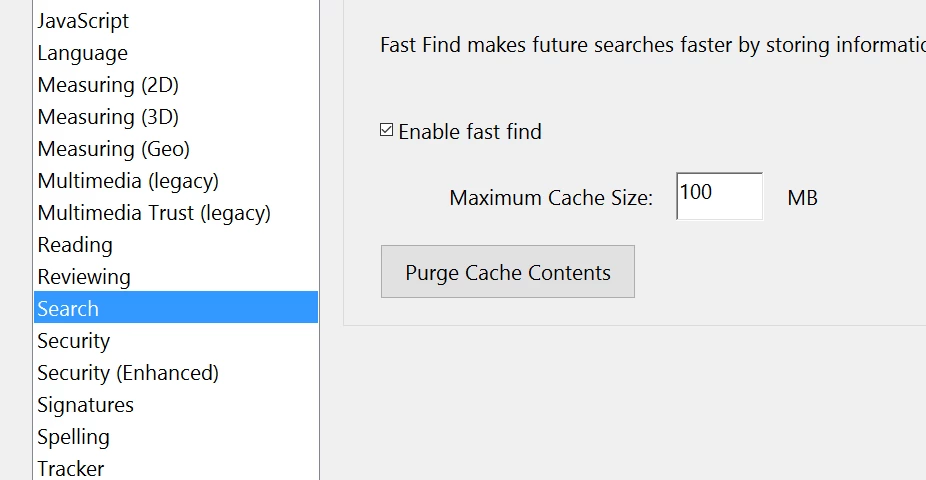
You may open the Acrobat Reader>Preferences> Search> select "Purge Cache Contents" and also disable "fast finding"

If this doesn't work, then uninstall the application using cleaner tool- Download Adobe Reader and Acrobat Cleaner Tool - Adobe Labs 

Download it through- Adobe - Adobe Acrobat Reader DC Distribution

Hope this helps.

Regards,

Akanchha

1 reply

AkanchhaS8194121
AkanchhaS8194121Correct answer
Legend
November 30, 2018

Hi Dandanpeng,

Could you please confirm the exact version of Acrobat DC? Open Reader>Adobe Reader>select About Adobe Reader.

You may open the Acrobat Reader>Preferences> Search> select "Purge Cache Contents" and also disable "fast finding"

If this doesn't work, then uninstall the application using cleaner tool- Download Adobe Reader and Acrobat Cleaner Tool - Adobe Labs 

Download it through- Adobe - Adobe Acrobat Reader DC Distribution

Hope this helps.

Regards,

Akanchha

Participant
August 30, 2023

the page no longer exists, any other bright ideas?