
HELP PLEASE: PDFs won't preview in file explorer
Hi
I am hoping someone can help me with this current issue I am having. I don't know if it is an Abode or Microsoft issue but it is really frustrating.
I run a business that is 100% paperless and involves a lot of data entry. All scanned documents are renamed and then processed.
Needless to say that I use File Explorer all day long. The issue I have is with the previewing of PDF files. If I open a new File Explorer window none of the Pdfs will preview. This can happen once a day or 50 times a day. Even with each new folder opened, then there are days where the pdf's preview every time with no issues.
I have searched the net for a solution and the only thing I can find that tends to work is to open Task Manager and End task on the Adobe Acrobat background processes. Funnily every time I go to task manager there are always 2 occurrences of Adobe running. Initially this advice related to 32bit files but now works on the files listed below.
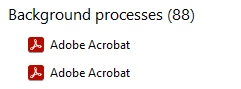
Once I run the end task I can preview the Pdf files again.
This problem occurs so many times a day that Task Manager has now been pinned to the task bar for ease of access.
I have tried updating the adobe reader but that didn't do anything.
This problem is happening on 2 pcs
If anyone can shed some light on why this keeps happening I would love to know.
 AdChoices