
Participating Frequently
September 5, 2025
Answered

Hide the “welcome” screen?

  • September 5, 2025
  • 1 reply
  • 522 views

I have installed Adobe acrobat reader on my Mac. When no PDF files are open, I see it automatically opens a “welcome” screen, the default page being the Recent tab. This tab contains advertisements which I don’t like so I would like to hide this tab or perhaps the whole default screen When acrobat reader launches. Can I find a setting to do that in the preferences?


Architecture: x86_64

Processor: Intel

Build: 25.1.20643.0

AGM: 7.1.17

CoolType: 10.0.7

JP2K: 4.0.2.54782
Correct answer creative explorer

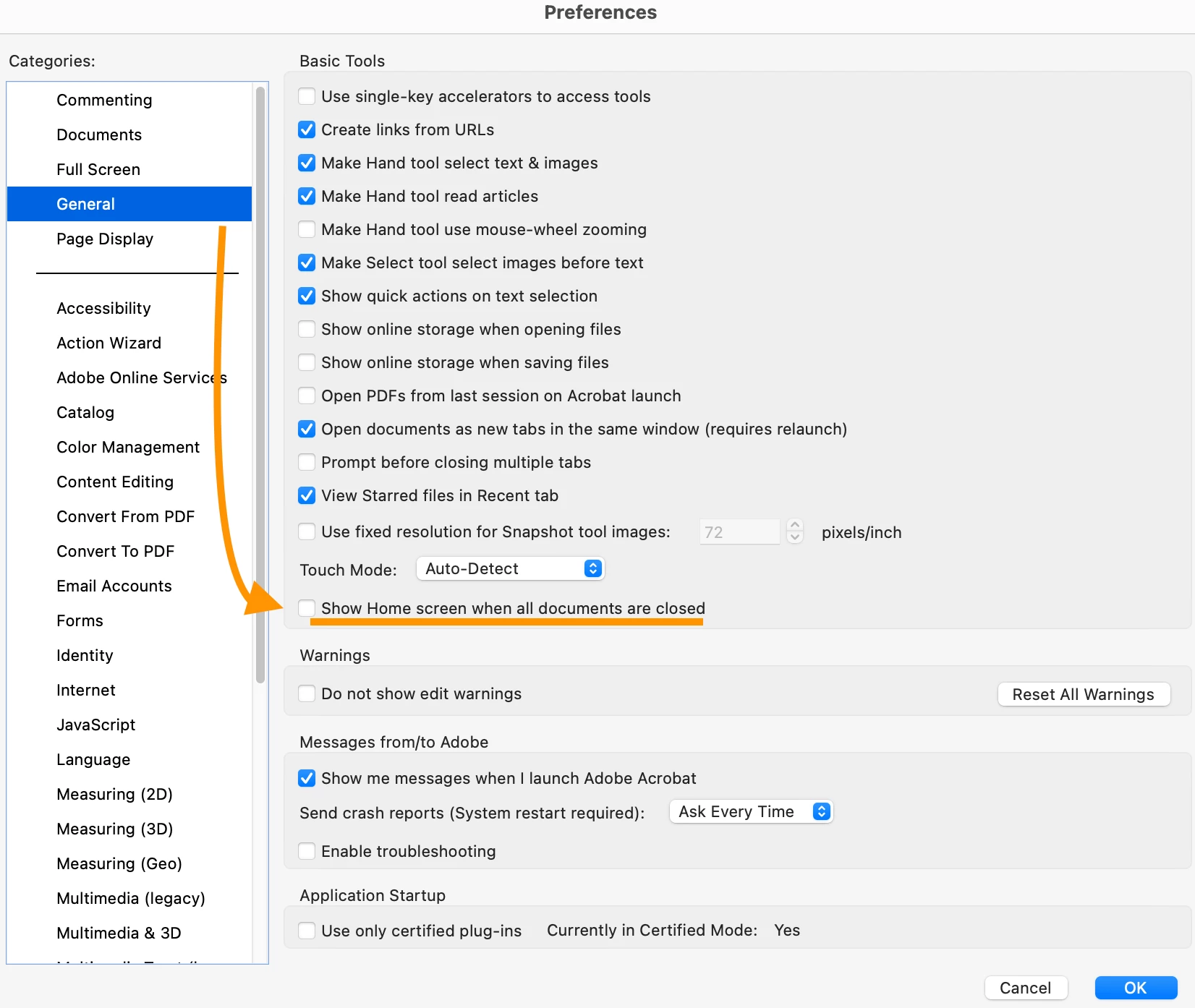
@MacUserSince96 Totally! On a Mac, you can typically find this by going to Acrobat Reader > Preferences in the menu bar. From there, navigate to the General category and uncheck the box next to this option. By doing so, you prevent the application from defaulting to the home screen with its "Recent" tab and advertisements. Instead, when you launch the application without opening a specific PDF, the main application window will be a blank, document-less interface. I do this when I work at client offices with my MacBook... I don't want them to see what else I am working on either! 


1 reply

creative explorer
Community Expert
creative explorerCommunity ExpertCorrect answer
Community Expert
September 7, 2025

@MacUserSince96 Totally! On a Mac, you can typically find this by going to Acrobat Reader > Preferences in the menu bar. From there, navigate to the General category and uncheck the box next to this option. By doing so, you prevent the application from defaulting to the home screen with its "Recent" tab and advertisements. Instead, when you launch the application without opening a specific PDF, the main application window will be a blank, document-less interface. I do this when I work at client offices with my MacBook... I don't want them to see what else I am working on either! 


m
Inspiring
October 8, 2025

Hi @creative explorer  This no longer seems to be working... I've always left that box unticked, but today Acrobat seems to be ignoring this preference and continues to show the Home Screen when documents are closed. Is there another setting somewhere that could be affecting this?
Processor: Apple M1 Max

Build: 25.1.20756.0

leo.r
Community Expert
Community Expert
March 12, 2026

@troyjack This setting doesn’t work anymore (if it ever did at all). In this thread (started 3 years ago), Adobe seems to confirm that it’s impossible to disable the Home screen (which is especially disruptive for automated workflows).