
Participant
February 25, 2023
Question

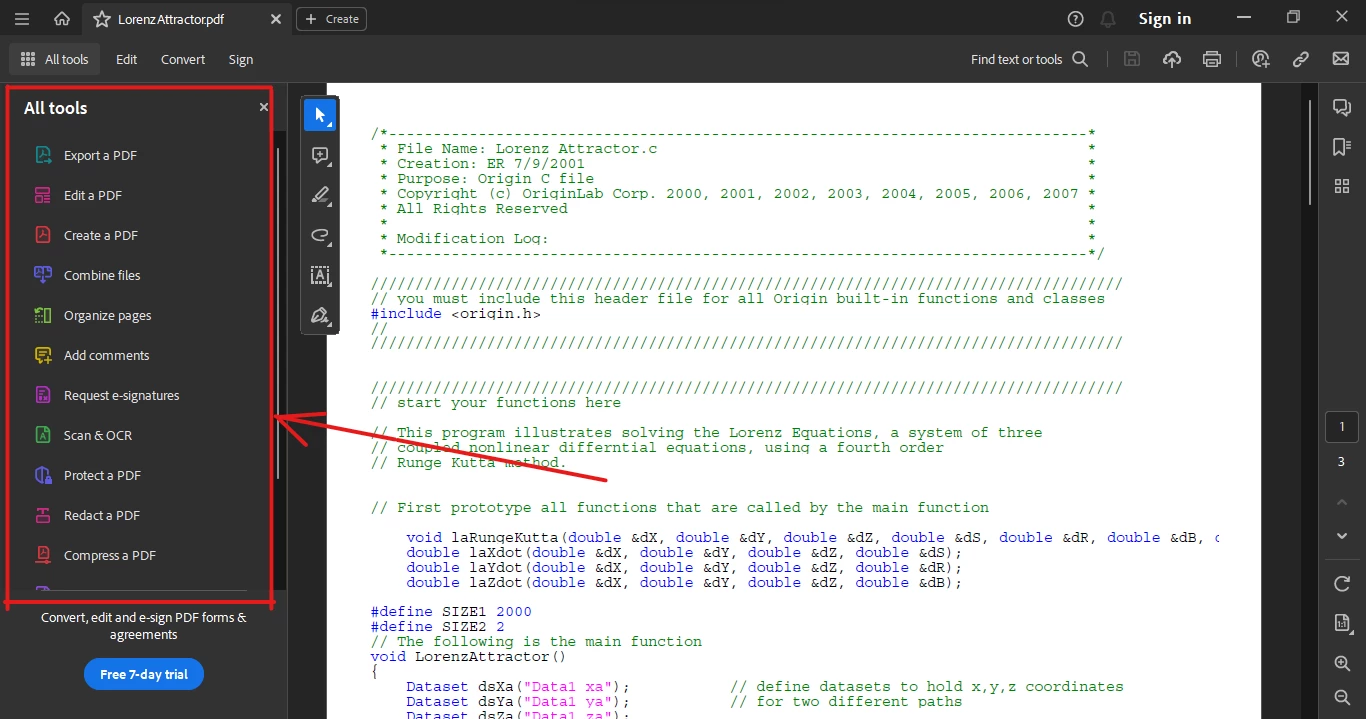
Hiding tool panel does not work on latest 2023 update

  • February 25, 2023
  • 1 reply
  • 1652 views

Hello, is there any to hide the tools panel in Acrobat Reader latest version (v2022.003.20322 64-bit)? It appears all the time when I open a PDF document, I didn't find any way to hide it. Any help is appreciated. Thanks.
 

This topic has been closed for replies.

1 reply

AkanchhaS8194121
Legend
February 28, 2023

Hi @Binoy26948485b17e 


Thanks for reaching out. 

If you are willing to disable the Toolpane permanently, here are some changes that you need to make. 

1- You can either change the preferences setting following the steps given here: https://helpx.adobe.com/acrobat/kb/disable-right-hand-pane-in-acrobat-reader.html 

2- Or you can permanently close the tools pane in Adobe Acrobat Reader by modifying the value of a registry key. https://helpx.adobe.com/acrobat/kb/how-to-permanently-close-the-tools-pane-in-adobe-acrobat-dc.html 


Let us know if this works.

Got your issue resolved? Please label the response as 'Correct Answer' to help your fellow community members find a solution to similar problems.


Thanks,

Akanchha

Participating Frequently
March 2, 2023

Hello, have you checked those methods for the latest acrobat reader before posting on the forum?

The first method doesn't work on the latest update (i.e., with the new UI). You can check it. This only work if I switched to the old UI.

The second method also doesn't work as there are no such registry keys in the registry editor.


Participating Frequently
March 8, 2023

Guys, any help? Still no answer.