Participant
August 5, 2021
Answered

HIGH MEMORY USAGE
  • August 5, 2021
  • 2 replies
  • 31423 views

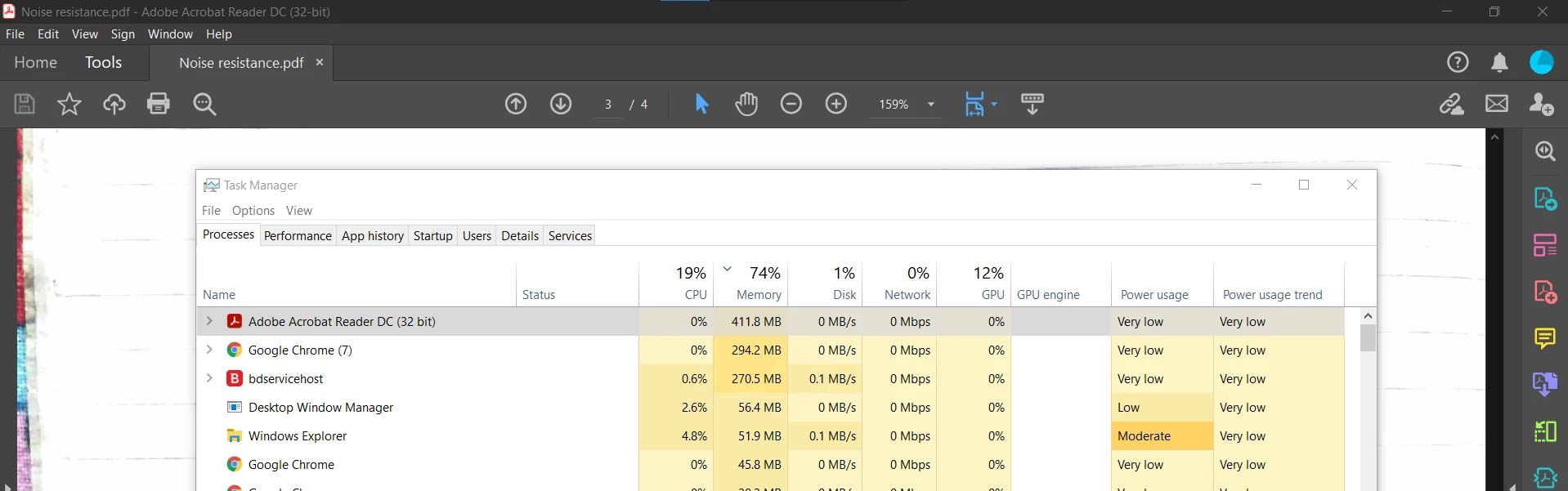
Why does the adobe reader uses 400 MB RAM for a simple 4 pages document? Please help me fix it..

This topic has been closed for replies.
Correct answer Amal.

Hi Parth_D


Hope you are doing well and sorry for the trouble. As described, Adobe Reader uses 400 MB RAM for a simple 4 pages document


Would you mind sharing the version of the Adobe Acrobat Reader DC you are using? To check the version go to Help menu > About Acrobat and make sure you have the latest version installed. Go to Help menu > Check for updates and reboot the computer once.


Also try the following preference setting and see if that works for you. Go to Edit (Win), Adobe Acrobat (Mac) > Preferences > Page Display > Rendering > Uncheck  'Use page cache' > Click OK and reboot the application.


Let us know how it goes


Regards

Amal

2 replies

Participant
November 11, 2022

I have the same exact issue with Premiere Rush. Any tips?

Legend
November 11, 2022

Not really going to be the same issue. Try the Premiere Rush forum. Good luck!

Amal.
Community Manager
Amal.Community ManagerCorrect answer
Community Manager
August 5, 2021

Hi Parth_D


Hope you are doing well and sorry for the trouble. As described, Adobe Reader uses 400 MB RAM for a simple 4 pages document


Would you mind sharing the version of the Adobe Acrobat Reader DC you are using? To check the version go to Help menu > About Acrobat and make sure you have the latest version installed. Go to Help menu > Check for updates and reboot the computer once.


Also try the following preference setting and see if that works for you. Go to Edit (Win), Adobe Acrobat (Mac) > Preferences > Page Display > Rendering > Uncheck  'Use page cache' > Click OK and reboot the application.


Let us know how it goes


Regards

Amal

Parth_DAuthor
Participant
August 5, 2021

unchecking the page cache option solved the issue.