
Participant
December 26, 2016
Answered

How can I remove the large tool-field?

  • December 26, 2016
  • 2 replies
  • 829 views

I have never needed the large tool field, is it possible to remove it?

The field that I'm thinking of is the large one to the right:
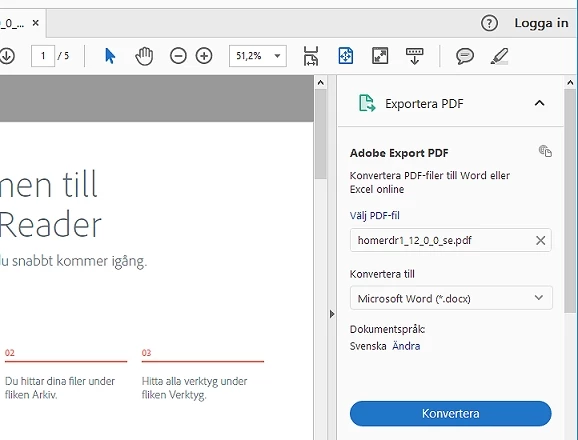
(it's in Swedish..)
It would be great if someone could help me

Kind regards

G. Rosenhoff

This topic has been closed for replies.
Correct answer gener7

Click on the tiny triangle to hide that panel.

You can't remove it. You can only Show and Hide the Tools Panel. But once you Hide it, it stays that way no matter what document you open.

2 replies

Participant
April 4, 2017

Yes, you can close the Tools Tray, but then the document takes the whole screen...  How can you make the page smaller so you can see and click to switch to other windows behind it for other applications?  Filling out a  form, I need data from another file, but can't get Adobe out of the way!  So rude, the new Adobe won't give any portion of the screen, closing the aggravating boxes on the side just then makes the document a screen hog, even when clicking any of the sizing buttons!  What happened to sizing the window??  The "Help" files have nothing on such simple stuff, as always.  Please help!  I promise I'll never upgrade again!

Legend
April 4, 2017

Isn't it just maximised? What about the Restore button?

gener7
Community Expert
gener7Community ExpertCorrect answer
Community Expert
December 26, 2016

Click on the tiny triangle to hide that panel.

You can't remove it. You can only Show and Hide the Tools Panel. But once you Hide it, it stays that way no matter what document you open.

vizzerAuthor
Participant
December 26, 2016

Thanks for your quick answer!

I guess that I have to live with it, even if it's rather annoying

gener7
Community Expert
Community Expert
December 26, 2016

It's really like a slide out Tools tray that you can customize by adding favorite tools and removing unwanted ones.