
Participant
May 14, 2025
Answered

How do I add exact url in signature ?

  • May 14, 2025
  • 1 reply
  • 271 views

Hello, I am trying to add a specific website link to a signature, which is https://scridex.ro/v-a-sau-va-cum-se-scrie-corect/ but for some reason whenever I add it it gets changed automatically to https://scridex.ro/

Is there any way to add the exact url instead of the homepage url ?

This is important because the pdf is about v-a sau va , so using the homepage is kind of pointless 
Correct answer creative explorer

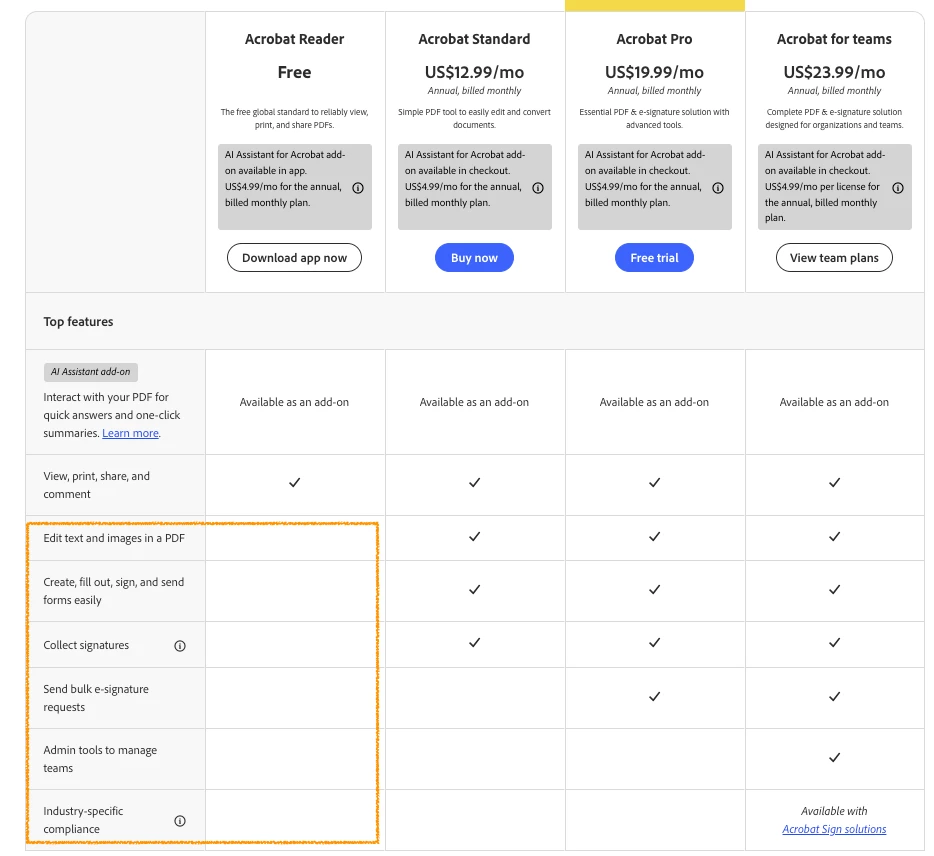
@Gramatica_Romana2822  I hate to be to say this, but.... embedding a clickable hyperlink within a digital signature field in Adobe Acrobat Reader is not a standard feature. Acrobat Reader is primarily designed for viewing, signing, and annotating PDFs, not for creating or extensively modifying interactive elements like signature fields with embedded hyperlinks. The functionality to add or edit the properties of signature fields, including embedding dynamic content like hyperlinks, is typically reserved for the editing capabilities of Adobe Acrobat Pro or Adobe Acrobat Standard. 

https://www.adobe.com/acrobat/pricing/compare-versions.html:


1 reply

creative explorer
Community Expert
creative explorerCommunity ExpertCorrect answer
Community Expert
May 16, 2025

@Gramatica_Romana2822  I hate to be to say this, but.... embedding a clickable hyperlink within a digital signature field in Adobe Acrobat Reader is not a standard feature. Acrobat Reader is primarily designed for viewing, signing, and annotating PDFs, not for creating or extensively modifying interactive elements like signature fields with embedded hyperlinks. The functionality to add or edit the properties of signature fields, including embedding dynamic content like hyperlinks, is typically reserved for the editing capabilities of Adobe Acrobat Pro or Adobe Acrobat Standard. 

https://www.adobe.com/acrobat/pricing/compare-versions.html:


m