
Inspiring
October 17, 2017
Answered

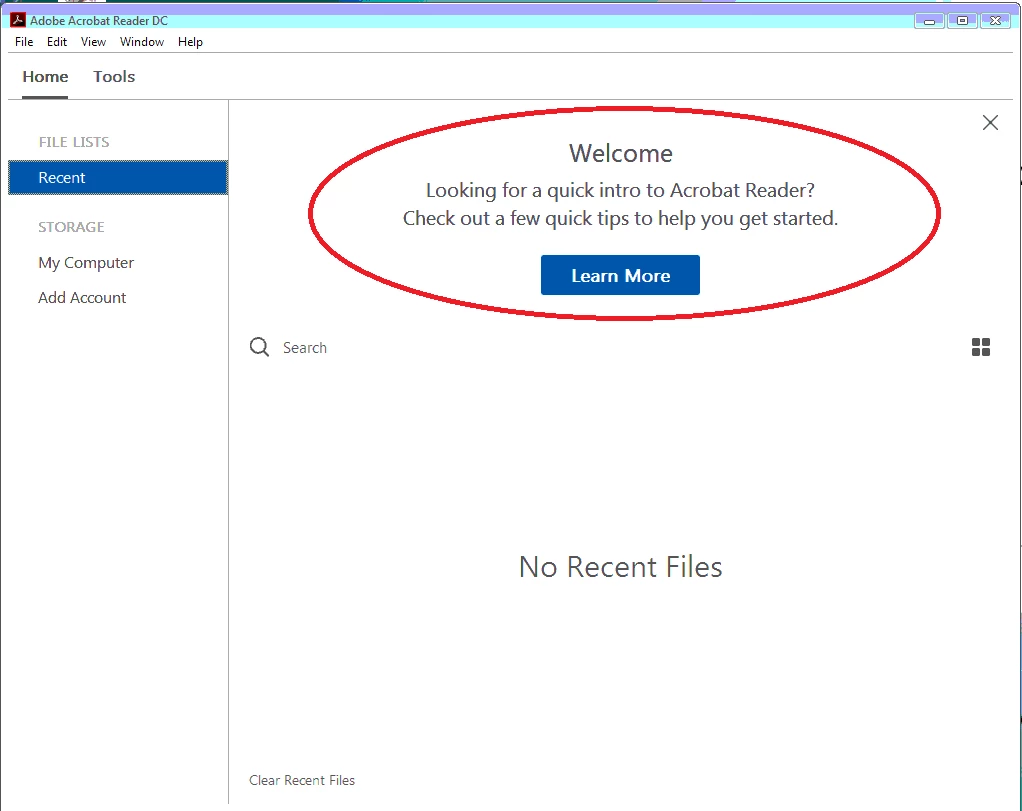
How do I get the Welcome message and Learn More button back?

  • October 17, 2017
  • 1 reply
  • 755 views

I have Acrobat Standard 2017.  Originally, there was a welcome message with a Learn More button displayed when I went to the Home view.  I clicked the X to close it, but now I need it back!  Anyone know how to restore it?
    This topic has been closed for replies.
    Correct answer AkanchhaS8194121

    Hi Tativa,

    We apologize for the delay in response to your query.

    First close Acrobat, then

    In order to activate the following screen, you can set the following registry to 0:

    HKEY_CURRENT_USER\Software\Adobe\Acrobat Reader\DC\AVGeneral\bHideUnreadMsgAtLaunch

    The following screen should come back when you launch again. 

    Hope this helps.

    Regards,

    Akanchha

    1 reply

    AkanchhaS8194121
    AkanchhaS8194121Correct answer
    Legend
    December 11, 2017

    Hi Tativa,

    We apologize for the delay in response to your query.

    First close Acrobat, then

    In order to activate the following screen, you can set the following registry to 0:

    HKEY_CURRENT_USER\Software\Adobe\Acrobat Reader\DC\AVGeneral\bHideUnreadMsgAtLaunch

    The following screen should come back when you launch again. 

    Hope this helps.

    Regards,

    Akanchha