Participant
Nov 1, 2015 11:21 AM UTC
Answered

How do I install Acrobat Reader DC on my D drive?

My C drive is a flash drive, big enough for the operating system but not much else. Therefore, I want to keep all my applications (wherever possible) on my D drive, but there doesn't appear to be a "destination drive" option in the the installer.

Kind regards,

Peter Clark.

    This topic is closed to new replies. Start a new post to keep the conversation going.
    AadeshSingh
    AadeshSinghCorrect answer
    Participating Frequently
    Nov 1, 2015 12:52 PM UTC

    Hi peteeclark,

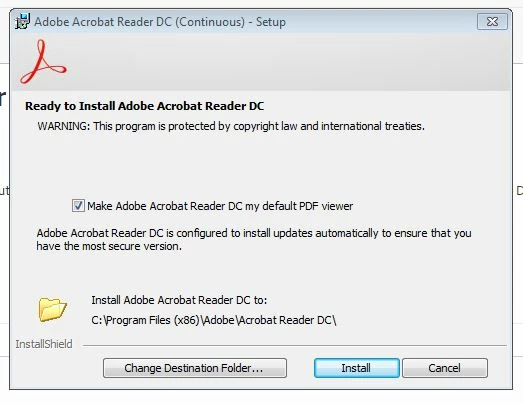
    Download Acrobat Reader DC using this link Adobe - Adobe Acrobat Reader DC Distribution, while installing you will get the below screen, try to Change the Destination Folder to D drive & proceed with the installation.

    Let me know if it works.

    Regards,
    Aadesh

    7 replies

    Legend
    May 9, 2018 10:03 PM UTC

    Get much more space on C.

    Translate
    AadeshSingh
    AadeshSinghCorrect answer
    Participating Frequently
    Nov 1, 2015 12:52 PM UTC

    Hi peteeclark,

    Download Acrobat Reader DC using this link Adobe - Adobe Acrobat Reader DC Distribution, while installing you will get the below screen, try to Change the Destination Folder to D drive & proceed with the installation.

    Let me know if it works.

    Regards,
    Aadesh

    Translate
    Participant
    Nov 1, 2015 7:52 PM UTC

    Yes, it works. Thank you.

    Kind regards,

    Peter.

    Translate
    AadeshSingh
    Participating Frequently
    Nov 2, 2015 1:48 PM UTC

    Hey peteeclark,

    You're welcome!

    Regards,

    Aadesh

    Translate