
Participant
November 3, 2015
Answered

How Do I Print Double Sided

  • November 3, 2015
  • 10 replies
  • 190746 views

How do you print double sided from Adobe Reader?

I have tried 'File >> Print' which brings up the print dialogue box.

There are no options for double sided/duplex on the basic view. I have two options: 'Properties' and 'Advanced'. Properties also has an 'Advanced' option. The double sided/duplex option does not appear on any of these forms, even after I have expanded all the menus.

I have been searching the internet for days and I can't find an answer to this (what I though would be very simple) question.

My printer is capable of printing double sided so it is a setting in Adobe that is not showing up.
Correct answer fbidwell

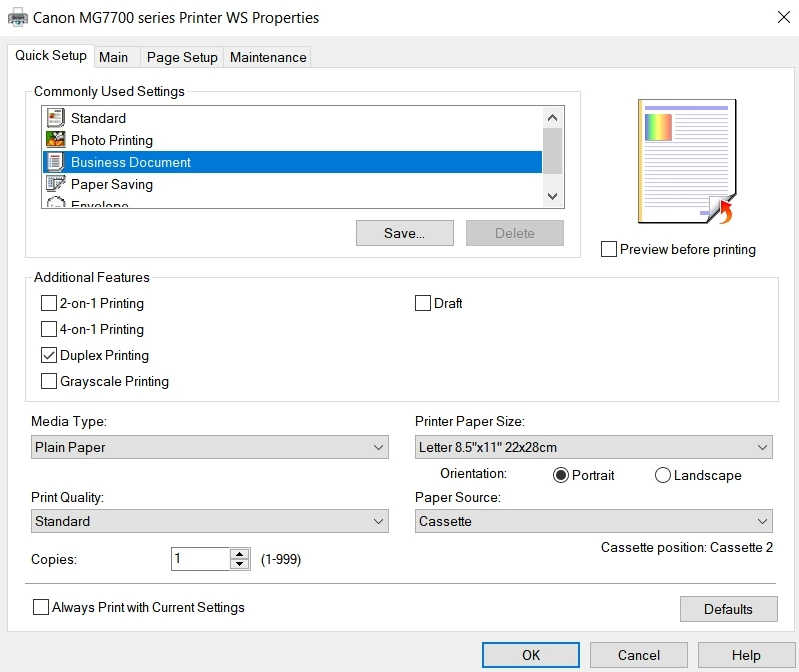
I had the same issue - NO OPTION for DOUBLE SIDED in Print Dialogue. Try this Click Printer Properties / Quick Setup and under Additional Features check off Duplex Printing. I applied the new setting closed and reopened Print box and the option to print double sided appeared. Hope that helps!


Thank you! Enabling Duplex printing was the thing that worked for my Brother printer. I could print double-sided without enabling Duplex in other programs, but not Adobe Acrobat.


I went to Printers & Scanners, found my printer and clicked Manage, then Printer Properties, then Device Settings, then Installable Options, then for Duplex Unit I selected Installed. The Apply and Ok


What a ridiculous set of hoops to jump through!

10 replies

KarinTengnäs
Participant
January 31, 2026

Thank you for this post - it solved everything for me to follow these steps!!! “I went to Printers & Scanners, found my printer and clicked Manage, then Printer Properties, then Device Settings, then Installable Options, then for Duplex Unit I selected Installed. The Apply and Ok.“

DeboraLG5
Participant
May 6, 2024

The only way I finally found to be able to print double-sided was I got out of the app and opened it up in a Chrome browser. Tried all of the other suggestions, but none of them worked as long as I was using the app. Hope that helps someone.

Participant
May 5, 2022

Quicker to uninstall Adobe and use something else than wade through all of this 'advice', or wait for some lazy fk from Adobe to respond or fix the problem

Participant
September 27, 2023

Sorry, but none of this is working; I am printing both sides with everything, except Adobe, hich apparently overules or is unable to folow the setup. Soo, inasmuch as it is a software malfunction, I expect Adobe to pay me a new printer

Participant
March 17, 2022

hi    i think i might know what was  the issue.    it might be a little glitch from Adobe  but they can investigate it.

so i had same issue    my Printer has double side printing  and the name of my printer was changed and through Adobe   the check box dissapeared.     so i could not choose any more to print double sided in adobe print configuration.        so i deleted  the printer from settings  and  enroled  again      and with default name   i have the double side check box back.    again renamed my printer   and the box dissapeared in adobe.   i tried couple of times  and this is the issue    now i dont rename my printer  and stays by default.       Adobe  team  hope it helps  

February 23, 2020

Hello

I had the same issue on Feb 23, 2020 with Brother HL-L2370DW (Windows 10).

Yes, the same with me. Doublesided printing was available on MS Word but not on Adobe Reader DC.

After reading the hints in this thread, here is what I did to fix the issue. Thanks to all.

Control Panel - Devices and Printers - Right click on the printer icon and select Printer Properties - Click on Device Settings tab.

Look under Installable Options - Duplex Unit: from drop down menu select: Installed

Click Ok.

That made the doubleside printing in Adobe Reader DC available.

Hossein

Participant
June 8, 2020

hossein2020, this helped me solve the same problem with an HP Officejet Pro 8600.  Thanks for taking the time to help others.

October 17, 2019

Hey folks! I was running into the same problem not being able to print double sided with Adobe Acrobat DC and in Illustrator. I've found a work around for Illustrator and I was so hoping the fix in Illustrator could be replicated in Adobe Acrobat, but unfortunately it didn't work.


See attachement above

This document had two pages that I wanted to print back to back. When I click on ALL pages it wouldn't print double sided. Then I tried clicking RANGE and put the entire document range from 1-2 pages and then hit print. It worked! So for those of you who have Illustrator and open your PDF in there to print, this is a little fix.


Best,

Sarah


Inspiring
August 17, 2019

So I have the opposite problem - its printing duplex when I want s/s. And only in acrobat. And no longer have the button to on/off the double sided print.

Followed the instructions on the Adobe page to get to the Utilities / Terminal only to get a lock where I enter my password (and I'm the owner, Admin, and only user of this printer!). No info how to unlock so no success.

The notable line on the Adobe page for this is: "Currently, the print settings in macOS take precedence over the print settings in Acrobat or Acrobat Reader." SOOOOO, there ya go: Adobe needs to fix this issue and keep print controls in Acrobat. It doesn't happen in any other program, so it can be done -- it is up to Adobe to fix. Soon I hope!

Participant
May 30, 2019

Here is an awkward work-around (I used to use this before double printing was standard):

1. Print all odd pages - reversed (odd first in case there's a blank last page)

2. Put the paper back in the printer (according to whatever direction your printer prints)

3. Print all even pages - reversed.

You should end up with a complete double-sided set.

T68203159
Known Participant
May 31, 2019

yeah, tks!  Ive tried that before and inevitably I get a jam, 2 pages get sucked up at the same time or something goes wrong and I have to do it over wasting time and ink and getting more frustrated.  Tks.  I have another thread going where these supposed know it all experts try to help and all they say it that its suppose to work.....  Cannon blames apple.  Apple says its adobes fault and adobe says it works....   blah, blah, blah.  works fine on pc and also in Mac apps - NOT adobe.   

T68203159
Known Participant
May 12, 2019

I am having this problem too with adobe reader dc on a Mac. There is no box anywhere for printing on my duplex enabled printer. No option under properties, printer, paper, etc. inside of adobe.

Where do you enable 2 sided printing?

abhissha
Community Manager
Community Manager
November 3, 2015

Hi,

Double Sided printing properties are part of printer function which can be accessed using Properties button after selecting the Printer from the Print dialog box in Acrobat app.

You can also have a look at this: Print double-sided | Acrobat, Reader

Thanks,

Abhishek

July 29, 2016

This doesn't help.  My printer is capable of printing double sided (I can print word documents that way); however, just does not give me the option when trying to print a PDF through Adobe.