
dma9551
Inspiring
July 1, 2019
Answered

How do I set a PDF at 350 dpi? (ID native file)

  • July 1, 2019
  • 2 replies
  • 5890 views

I am submitting a print-ready insert for a high-end brochure and they are requesting a 350 dpi rez. Working from InDesign, I don't believe there is a way to create that from the native file, and, since I've always provided ads at 300 dpi, wonder where in Acrobat I can set this higher rez. Added note: in the ad is a jpeg image I've formatted at 350 dpi in PS, and a vector logo).

Thanks ahead for comments/ tips.
    This topic has been closed for replies.
    Correct answer jane-e

    Hi DMA,

    When you export to a Print PDF from InDesign, you are given several presets, all of which can be customized and saved into a new preset (.joboptions). The button is in the lower left corner.

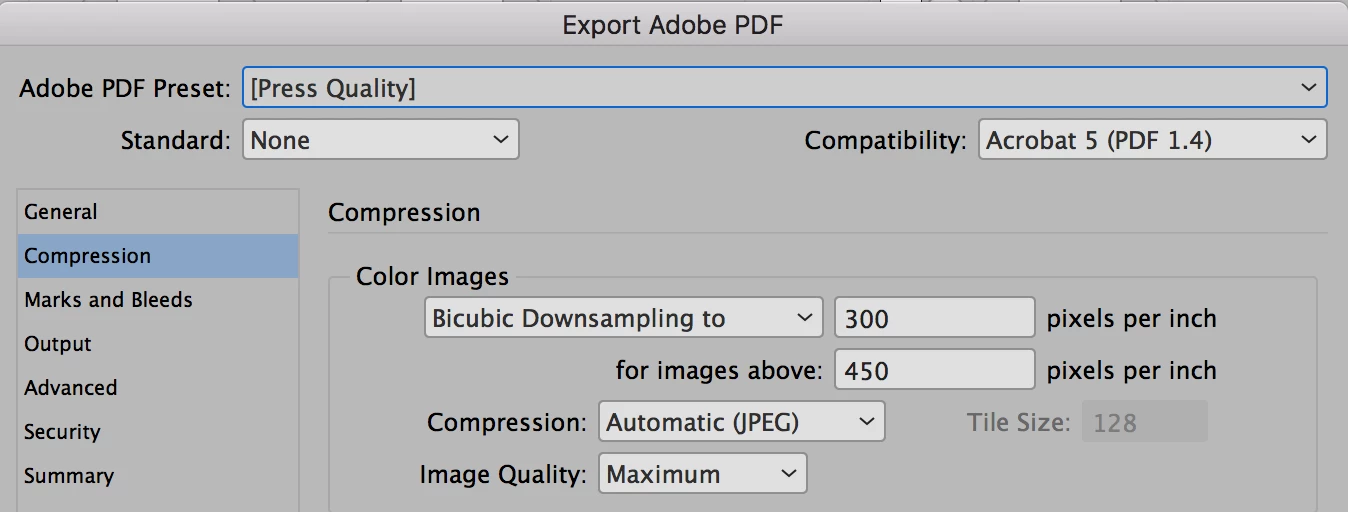
    Go to the Compression tab. The default for some presets is that if the images are over 450 pixels per inch (ppi), they will be 300 pixels per inch (ppi). Just change that number to 350 ppi for your printshop requirements. It will not upsample anything lower than 300 ppi.

    You won't see dots per inch (dpi), by the way, until you put dots of ink down on paper, and the printshop will be doing that part.

    Some printers will give you a .joboptions file that meets their specs. Otherwise, ask them which preset you should start with.

    This can't be done in Reader where you posted, btw.

    ~ Jane

    2 replies

    jane-e
    Community Expert
    jane-eCommunity ExpertCorrect answer
    Community Expert
    July 2, 2019

    Hi DMA,

    When you export to a Print PDF from InDesign, you are given several presets, all of which can be customized and saved into a new preset (.joboptions). The button is in the lower left corner.

    Go to the Compression tab. The default for some presets is that if the images are over 450 pixels per inch (ppi), they will be 300 pixels per inch (ppi). Just change that number to 350 ppi for your printshop requirements. It will not upsample anything lower than 300 ppi.

    You won't see dots per inch (dpi), by the way, until you put dots of ink down on paper, and the printshop will be doing that part.

    Some printers will give you a .joboptions file that meets their specs. Otherwise, ask them which preset you should start with.

    This can't be done in Reader where you posted, btw.

    ~ Jane

    dma9551
    dma9551Author
    Inspiring
    July 2, 2019

    Very helpful, thanks for this answer, and got it!

    And good catch on my mistake about Acrobat, what I had meant was "Adobe PDF presets". Yeah, not exactly the same

    jane-e
    Community Expert
    Community Expert
    July 2, 2019

    You’re welcome, DMA — I‘m glad it’s working for you!

    ~ Jane

    Legend
    July 2, 2019

    You can’t upscale the images in a PDF. You need to have an effective resolution of 350 ppl or more in InDesign, and export with custom settings to keep 350 ppi.