
BellaKara
Participant
October 4, 2018
Answered

How do I stop comment pop ups from opening when I highlight a test?

  • October 4, 2018
  • 3 replies
  • 5734 views

Help. This is really annoying. I need to stop the comment pop-ups from opening whenever I highlight a text. It's rare that I put in comments as is. I've tried everything including changing my preferences like the site says to do and still have the same problem.

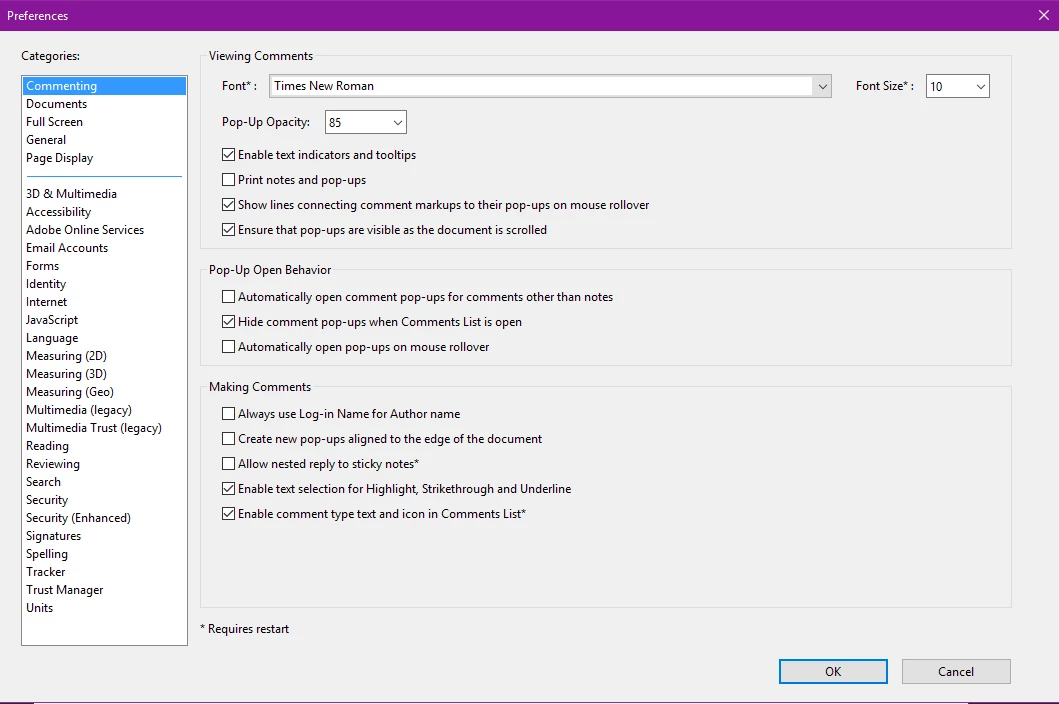
This is my preferences pane. It's always been in these settings. And the Automatically open comments pop-ups for comments other than notes has never been selected. It only started happening after the last upgrade. Acrobat had never done this before. I usually had to double click on the highlight to open the pop-up if I wanted to add a comment. Most of the time I just need to highlight so this is really annoying and I need it gone.
This topic has been closed for replies.
Correct answer AnandSri

Hello BellaKara,

I am sorry for the inconvenience caused and for the delayed response, the issue has been addressed with the latest patch release of Acrobat/Reader 19.010.20064, please install the latest patch from help>check for updates in Adobe Reader or manually from DC Release Notes — Release Notes for Acrobat DC Products

Reboot the machine and check.

Let us know if you experience any issue.

Thanks,

Anand Sri.

3 replies

Participant
August 14, 2020

I agree with the above user, this feature is extremely irritating. It slows the whole PC down when, for example, highlighting text in Adobe to cut and paste into another application like Excel, and then switching to Excel and having to twiddle your thumbs while the computer processes the switch from Adobe to Excel, something which NEVER used to happen. Please remove this pointless feature ASAP.

AnandSri
Community Manager
AnandSriCommunity ManagerCorrect answer
Community Manager
December 26, 2018

Hello BellaKara,

I am sorry for the inconvenience caused and for the delayed response, the issue has been addressed with the latest patch release of Acrobat/Reader 19.010.20064, please install the latest patch from help>check for updates in Adobe Reader or manually from DC Release Notes — Release Notes for Acrobat DC Products

Reboot the machine and check.

Let us know if you experience any issue.

Thanks,

Anand Sri.

AkanchhaS8194121
Legend
December 10, 2018

Hi BellaKara,

We apologize for the delay in response to your query.

This feature has been recently introduced with the latest version. It's  design behavior of the application which can not be changed via preferences.

Disabling this feature might be considered in upcoming release. For now you may fill this feature request form- Feature Request/Bug Report Form

Regards,

Akanchha