
Participant
August 11, 2017
Answered

How to activate read out loud with highlighting what is speaking and do what pages wanted to read and not just page by page?

  • August 11, 2017
  • 3 replies
  • 16623 views

I know how to activate the read out loud on the program Adobe Acrobat Reader. But it only does read out loud the page I'm at only.

And does not highlight the word or sentence that is reading to me.

I currently work at a University in the United States at a Disability Center, and some of the students have a hard time following alone and would really help them having their school books in alternate PDF format that they can use on their personal devices like tablets, computers, phones, etc. Few months ago before the recent update with the Adobe Acrobat Reader I/students was able to highlight what they want read and it would highlight what the software is reading for easy read alone. Is there a way we can have that back? This would help with people who can read their school books/other documents easier!!
Correct answer Adorobat

Hi Joshuah,

Sorry for the delayed response.

As per the description mentioned above, you want Acrobat Reader to highlight the text when selected for Read out Loud, is that correct?

If yes, have you tried activating Read out loud option in Reader by clicking View > read out loud > activate read out loud

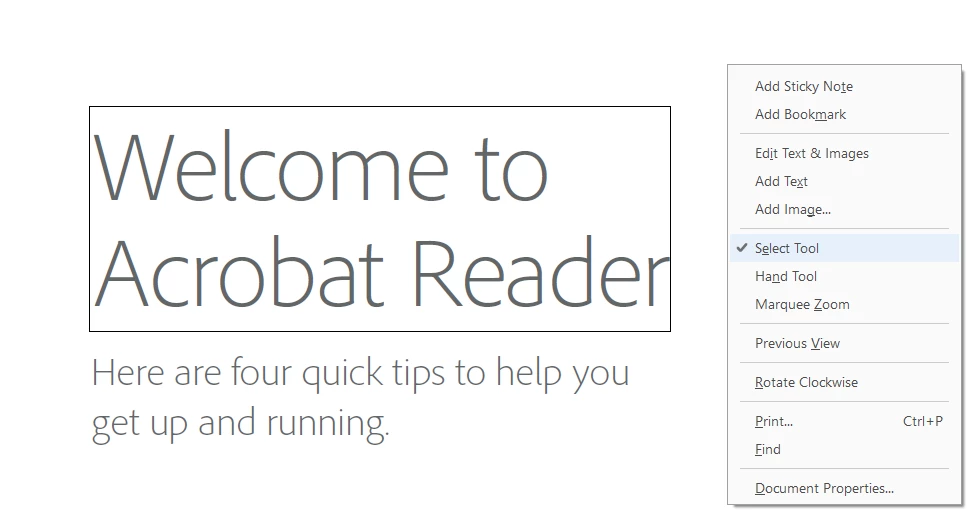
Right-clicking on the pdf > select tool and selecting the text, does that work?

Below is a screenshot:

If that doesn't work, try disabling protected Mode by going into Edit menu > preferences > under categories, click security (enhanced) > uncheck the box next to "Enable Protected Mode at startup" and then click OK.

Relaunch Reader and try again.

Please note: disabling protected mode is for troubleshooting purpose only, and not recommended. Please turn the feature back on after troubleshooting is complete.

Thank You,

Shivam

3 replies

Participant
December 5, 2020

Can you update this topic please? I do not even see the same things that is mentioned to fix the problem in my reader. 
Thank you,
Jodi

Bernd Alheit
Community Expert
Community Expert
December 5, 2020

What version of Acrobat Reader does you use?

Participant
December 5, 2020

It says continuous release 2020.013.20064. Does that help?

Adorobat
Community Manager
AdorobatCommunity ManagerCorrect answer
Community Manager
April 17, 2018

Hi Joshuah,

Sorry for the delayed response.

As per the description mentioned above, you want Acrobat Reader to highlight the text when selected for Read out Loud, is that correct?

If yes, have you tried activating Read out loud option in Reader by clicking View > read out loud > activate read out loud

Right-clicking on the pdf > select tool and selecting the text, does that work?

Below is a screenshot:

If that doesn't work, try disabling protected Mode by going into Edit menu > preferences > under categories, click security (enhanced) > uncheck the box next to "Enable Protected Mode at startup" and then click OK.

Relaunch Reader and try again.

Please note: disabling protected mode is for troubleshooting purpose only, and not recommended. Please turn the feature back on after troubleshooting is complete.

Thank You,

Shivam

Participant
February 16, 2023

I have done everything you said above, and I have acrobat pro-2020. It still doesn't highlight what it is reading out loud and makes it very difficult to follow. Please update this feature.

Participant
March 2, 2018

I need to be able to read along with highlighted text while read out loud reads the document.