Participant
Jan 7, 2021 10:12 AM UTC
Question

How to disable automatic comment pop up for photos

Hello,

I tried almost all settings in acrobat reader DC 20.013.20074 version    to disable automatic comments pop-up, it is very problematic especially in presentations  : 
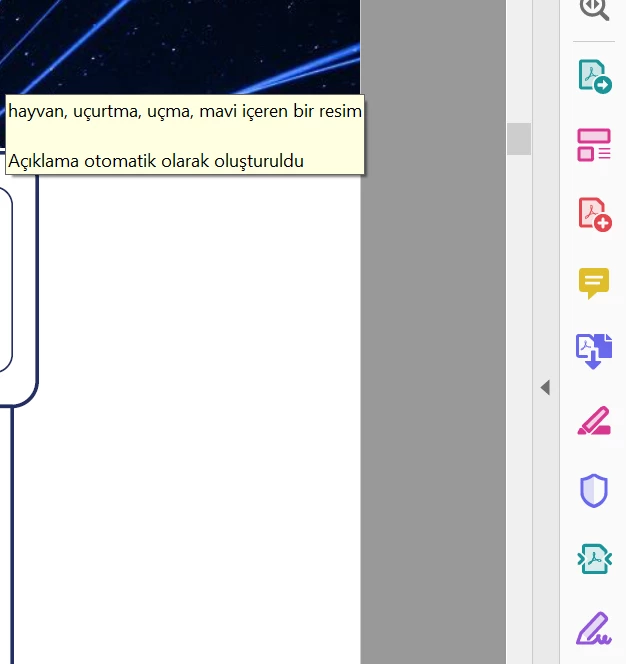


can you help?

 

This topic is closed to new replies. Start a new post to keep the conversation going.

5 replies

Bernd Alheit
Community Expert
Community Expert
Jan 8, 2021 7:41 AM UTC

How have you created the PDF file?

Translate
burak5F97Author
Participant
Jan 8, 2021 8:03 AM UTC

Yes, i transformed it from PPTX

Translate
Bernd Alheit
Community Expert
Community Expert
Jan 8, 2021 10:27 AM UTC

Play with the options when you export the file from Powerpoint.

Translate
AkanchhaS8194121
Legend
Jan 7, 2021 11:17 PM UTC

Hey!

thanks for the screenshot. Do you get this pop-up when scrolling upon the page? You may check the following Commenting preferences-

  • Navigate to Acrobat>Edit>Preferences>Pop-Up Behavior-
  • Uncheck these two 1st and 3rd if its already checked.


  • OK>Close and re-open Reader DC to apply the changes. 


Thanks,

Akanchha 

Translate
burak5F97Author
Participant
Jan 8, 2021 7:10 AM UTC

Yes , they are already unchecked  ( In Turkish please see below ) 


It happens when static page view, and also full-screen mode, and also normal page mode not in scroll down.

It says something about the photo  itself and after " comments created automatically" 

I first thought it was about accessibility settings, but it does not seem so.

It is very frustrating.


Translate