
Participant
March 5, 2022
Question

How to Disable Certificate signing in Acrobat Reader DC

  • March 5, 2022
  • 1 reply
  • 952 views

Hello,


we want to disable the option  Signing with certificates in Acrobat Reader DC.

There is a key provided by Adobe for disabling the feature in  

Services integration (adobe.com)


The key is:

bEnableCertificate


But it seems that here is a limitation to Version 11. 

Is there any solution for DC?
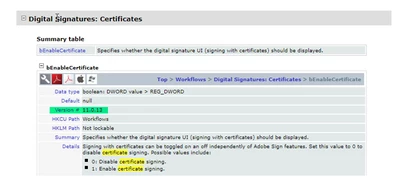


Can anyone help and know the solution for disabling only this function (Signing with Certificates via Registry Key)?


Regards

A.


This topic has been closed for replies.

1 reply

Amal.
Legend
March 8, 2022

Hi there


Hope you are doing well and sorry for the trouble.


Preferences under FeatureLockDown require administrator privileges to change. Setting these preferences locks the user interface so that the end user cannot change product functionality. The settings on this page include those which do not have a similar setting in user preferences.

For more info, please go through the help page https://www.adobe.com/devnet-docs/acrobatetk/tools/PrefRef/Windows/FeatureLockDown.html and see if that helps.


Regards

Amal

Participant
March 8, 2022

Hello,


well i know this functions for feature lockdown and we already set some keys.

But for disabling the certificate function there is no key available.

So why, other functions like fill& Sign, Adobe Sign can be switched of with the feature lockdown.


Regards

A.

Amal.
Legend
March 9, 2022

Hi there


Would you mind sharing the version of the application and the OS you are using?


Also, a small video recording of the steps you are doing would be very helpful.


Regards

Amal