
Participant
April 26, 2017
Question

How to disable file open/save dialog?

  • April 26, 2017
  • 1 reply
  • 3828 views

Hello,

Am using IE 11.0 and Acrobat Reader DC 15.0. When ever i try to open a PDF within the browser to view document, File Download dialog box is showing up. How can we disable it and open document in default mode without dialog box.

Here is dialog box that need to be disabled:
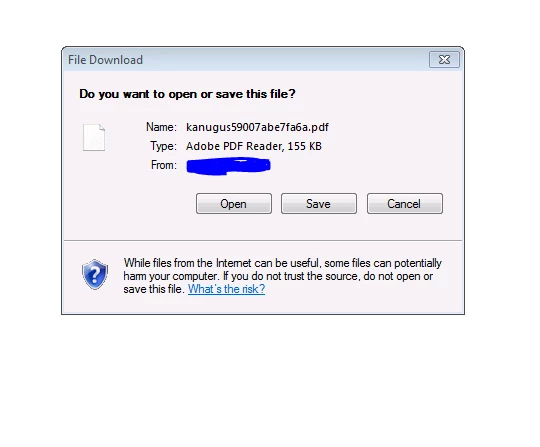
Thanks,

Sushma

    This topic has been closed for replies.

    1 reply

    Adobe Employee
    April 28, 2017

    Hi sushmak77616252,

    This dialog is thrown by 'Internet Explorer'. It will be good if you can provide below details -

    • Whether 'Adobe Reader' is default PDF handler or not?
    • Whether 'Adobe PDF Reader' add-ons is enabled or not? [To check go to IE Tools -> Manage Add-ons -> Show All add-ons from Dropdown -> Search for 'Adobe PDF Reader'  -> Check Status]
    • 'Reset all zones to default level' from Internet Options -> Security and try the workflow again.
    • Try opening file from local system in IE (drag drop PDF from local system in IE) and check whether the issue observed with local file as well,

    Please let us know your observation.

    Thanks,

    Gagan

    Participant
    April 28, 2017

    Hi Gagan,

    1. Adobe Reader is default PDF Reader.

    2. It is enabled.

    3. I did Reset all zones to default level.

    4. Tried opening file in local system. I could still see the issue.

    Thanks,

    Sushma

    soumik011
    Adobe Employee
    Adobe Employee
    May 1, 2017

    Hi Sushma,

    Thanks for sharing the information.

    Can you check whether the below registry entry is there in your system?

    "HKEY_CURRENT_USER\Software\Microsoft\Windows\CurrentVersion\Ext\Settings\{CA8A9780-280D-11CF-A24D-444553540000}\”

    If yes, can you export and share with us with the entries. You can drop me a mail at soudas@adobe.com

    Regards

    Soumik