michell95442113
Participant
October 12, 2017
解決済み

How to display 2 PDF files at the same time?

  • October 12, 2017
  • 返信数 3.
  • 33610 ビュー

comment afficher en même temps deux fichiers pdf ?

    このトピックへの返信は締め切られました。
    解決に役立った回答 jane-e

    Or...

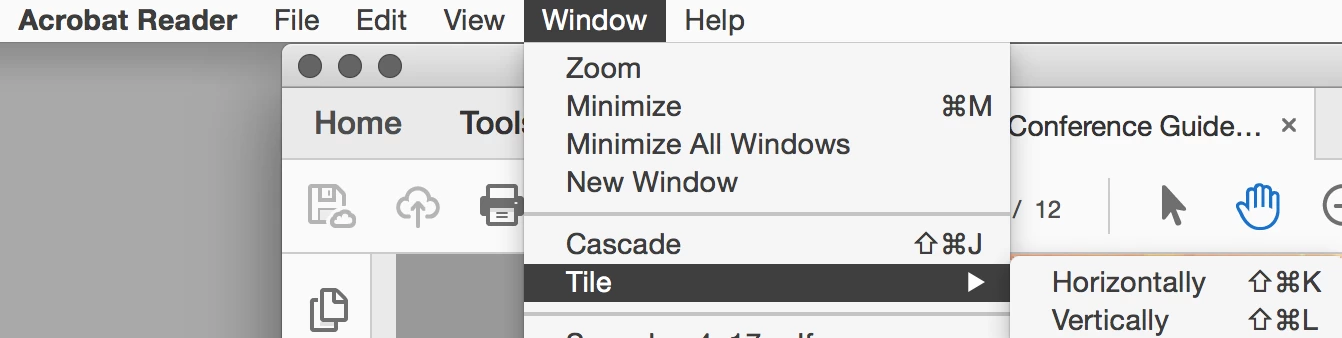
    Go to Window > Tile > and choose either Vertical or Horizontal.

    返信数 3

    jane-e
    Community Expert
    jane-eCommunity Expert解決!
    Community Expert
    October 13, 2017

    Or...

    Go to Window > Tile > and choose either Vertical or Horizontal.

    michell95442113
    Participant
    October 13, 2017

    Thank you Jane-e.

    At first, i did not understand, I don't know how to t(ranslate "tile".

    But your screen-copies are perfect, so I am OK.

    I'll remember the french word for tile : mosaïque.

    Michel Lesueur

    Legend
    October 13, 2017

    Or, more easily, drag the tab out of the window.

    Meenakshi_Negi
    Legend
    October 13, 2017

    Hi Michell,

    As you mentioned above to display the same files at same time, you can open PDF on two different Windows.

    For that, you will need to uncheck the box for "Open documents as new tabs in the same window" under the preferences.

    Launch the application and go to Edit menu > Preferences > General and uncheck the box.

    Once done, click OK at the bottom to save the changes and then relaunch the application.

    Now try to open the documents to view at the same time.

    Let us know if you are referring to something else.

    Regards,

    Meenakshi

    Participant
    May 14, 2021

    Excellent! And clear too!