


martinb40194939
Participant
July 20, 2018
Answered

How to display both distance dimensions with the measurment tool?

  • July 20, 2018
  • 1 reply
  • 2542 views

Currently I'm using the  Adobe Acrobat Reader DC Version 2018.011.20040

When using the Measure-Tool / Measuring Tool (Measurement Types: Distance tool) to measure the distance in a PDF the tooltip in the lower right corner also shows the angle, delta X and Y values (see left picture below). After deselecting the object and reselecting only the distance value is shown (see right picture below).
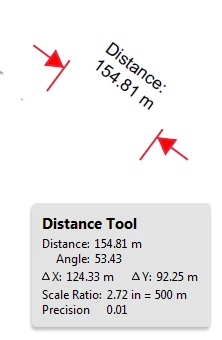
Is there a chance to access the angle, delta X and Y values again after deselecting the object?

Is there even the possibility to show the angle, delta X and Y values in the label instead just the distance?

Thanks in advance.

This topic has been closed for replies.
Correct answer AnandSri

Hello Martinb,

The Cursor Coordinates show the coordinate position of the pointer within the document pane. The position numbering begins in the upper-left corner of the document. Cursor Coordinates also shows the width and height of a selected object as you resize it.

You can only Choose View > Show/Hide > Cursor Coordinates and Move the pointer to view x and y coordinates. But there are no settings to show the angle, delta X and Y values in the label after deselecting the object.

For detailed information, you can refer to Grids, guides, and measurements in PDFs, Adobe Acrobat

You can also refer to Measuring Tool

You can fill the Adobe wish form to include a new feature or suggest modifications in the existing features Feature Request/Bug Report Form

Feel free to update this discussion for any further assistance.

Thanks,

Anand Sri.

1 reply

AnandSri
AnandSriCorrect answer
Legend
July 20, 2018

Hello Martinb,

The Cursor Coordinates show the coordinate position of the pointer within the document pane. The position numbering begins in the upper-left corner of the document. Cursor Coordinates also shows the width and height of a selected object as you resize it.

You can only Choose View > Show/Hide > Cursor Coordinates and Move the pointer to view x and y coordinates. But there are no settings to show the angle, delta X and Y values in the label after deselecting the object.

For detailed information, you can refer to Grids, guides, and measurements in PDFs, Adobe Acrobat

You can also refer to Measuring Tool

You can fill the Adobe wish form to include a new feature or suggest modifications in the existing features Feature Request/Bug Report Form

Feel free to update this discussion for any further assistance.

Thanks,

Anand Sri.