
Known Participant
November 20, 2018
Answered

How to force Acrobat and Reader to default to the Windows File/Save Dialog?

  • November 20, 2018
  • 3 replies
  • 8898 views

I'm very frustrated. In my PCs I have either Acrobat DC or Reader DC.  (I have three main PCs.)

When I go to File > Save As, an Adobe dialog box comes up with some recent locations to save. I then have to select "Choose a Different Folder" which opens the default Windows file/save dialog box. 
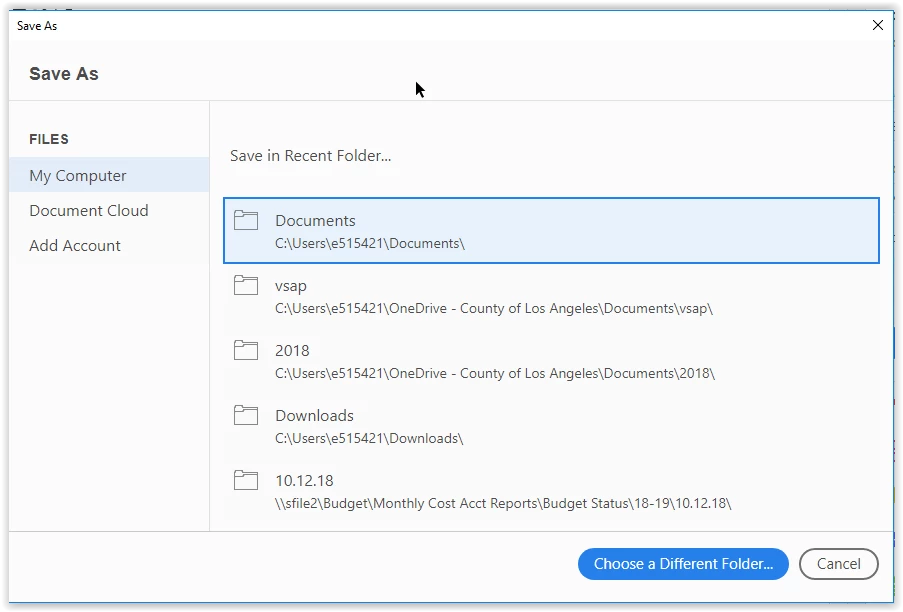
Is there an option to force the Windows dialog box to open by default? Not sure why Adobe has a custom one, all my other Windows apps use the default, which is much easier.
    Correct answer Tariq Ahmad

    Hi PerfectReign,

    Sorry for the delay in response

    You may try the following steps and let us know if that works for you.

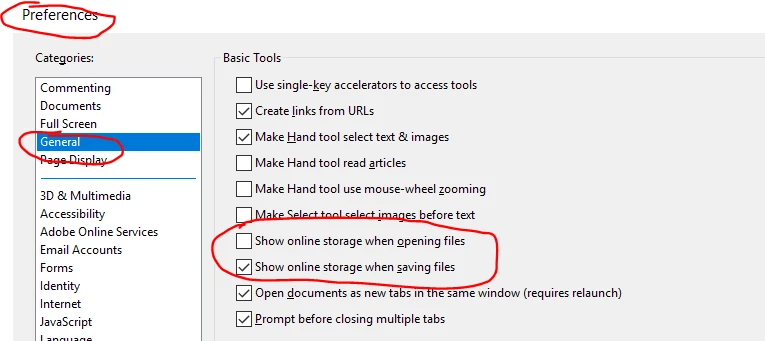
    Launch Reader>Edit>Preferences > Categories> General

    Uncheck: "Show online Storage When opening files" & "Show online Storage When saving files"

    -Tariq Dar

    3 replies

    Participant
    August 28, 2025

    THANK YOU! This is what has been driving me NUTS!!!!! I absolutely hate completely unecessary extra clicks. Never understood why any software designers do annoying things like this, aaaarg. REDUCE clicks and steps, ya'll, don't ADD clicks and steps. Stupid. Thank you for sharing this solution!

    Participant
    September 4, 2020

    Has Adobe added a feature for save to default to the last file location?  Similar to other users sometimes I have to save multiple documents to the same file and it is a slow and cumbersome process to repeatedly have to select the file location instead of simply defaulting to the last file location used.

    Please help!

    Participant
    May 11, 2022

    merhaba 

    Bu sorun çözüme kavuştu mu. gereksiz ve zahmetli bi iş bu. adobe XL de kayıt için ayrıça seçim yapmaya gerek yoktu.

    Tariq AhmadCommunity ManagerCorrect answer
    Community Manager
    November 28, 2018

    Hi PerfectReign,

    Sorry for the delay in response

    You may try the following steps and let us know if that works for you.

    Launch Reader>Edit>Preferences > Categories> General

    Uncheck: "Show online Storage When opening files" & "Show online Storage When saving files"

    -Tariq Dar