Resuelto
How to navigate between open documents (Mac Ventura)
Is it possible to toggle between tabs? If not, to open docs in separate windows?

Is it possible to toggle between tabs? If not, to open docs in separate windows?
We apologize for the delay in response.
It seems you are looking for a keyboard shortcut or an easier way to toggle between multiple document open. There's no shortcut for switching between tabs, open in the same window.
however, you can open pdfs in different Windows and then toggle between them with Alt+Tab.
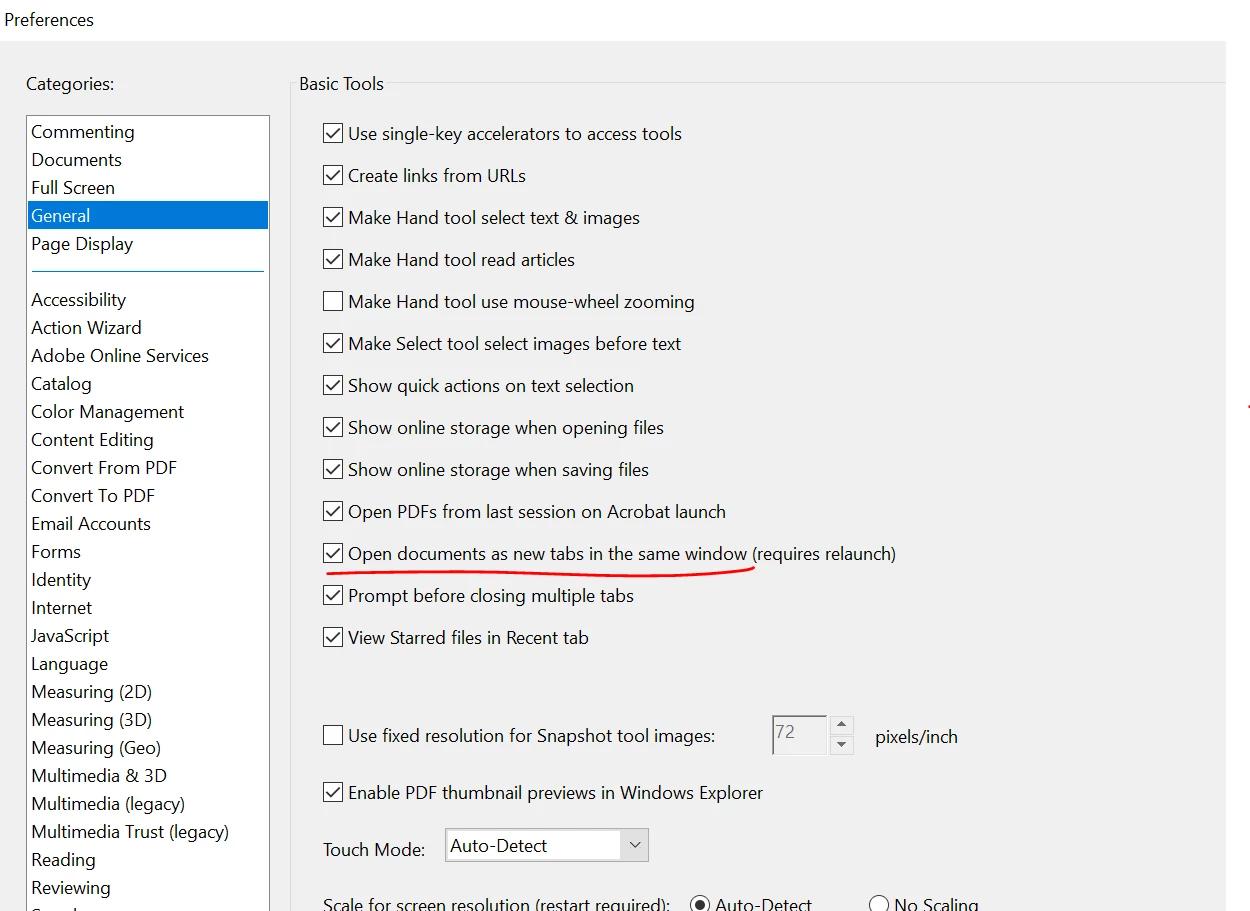
Navigate to Acrobat>Preferences (Ctrl+K)> General> uncheck Open documents as new tabs in the same window.
Here are some very useful keyboard shortcuts for future reference: https://helpx.adobe.com/acrobat/using/keyboard-shortcuts.html
Got your issue resolved? Please label the response as 'Correct Answer' to help your fellow community members find a solution to similar problems.
Thanks,
Akanchha
Enter your E-mail address. We'll send you an e-mail with instructions to reset your password.


 AdChoices