Answered
How to prevent PDF documents from being converted to word
Hi there,
I have created a PDF document and would like to prevent it from being converted to Word to ensure that my document cannot be copied.
How can I do this?
Thanks.

Hi there,
I have created a PDF document and would like to prevent it from being converted to Word to ensure that my document cannot be copied.
How can I do this?
Thanks.
Hi Theresh,
You can apply password security to restrcit editing on your document. Please follow the steps below:-
1) Open the document in Acrobat.
2) Right click on the document and click on "Document properties".
3) Go to "Security" tab.
4) Select "Password security" from security method.
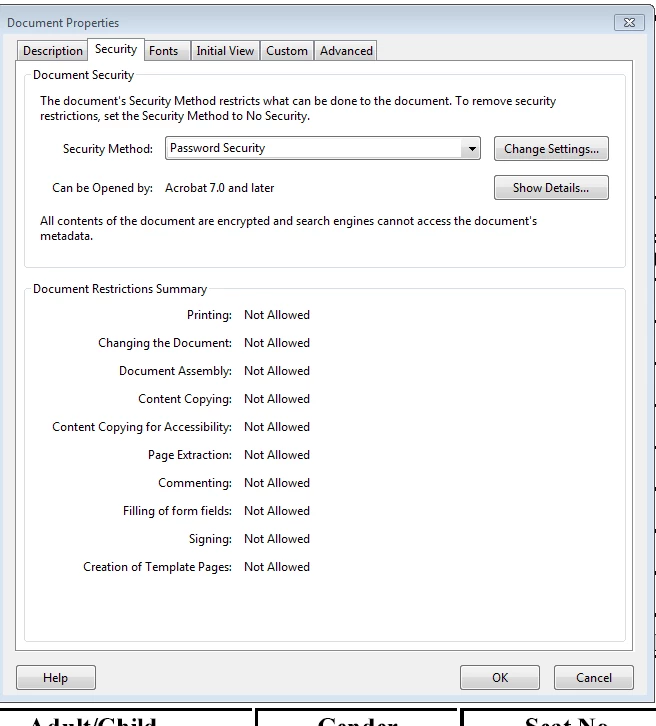
5) Click on "Change settings".
6) Check the box which says "Restrict editing
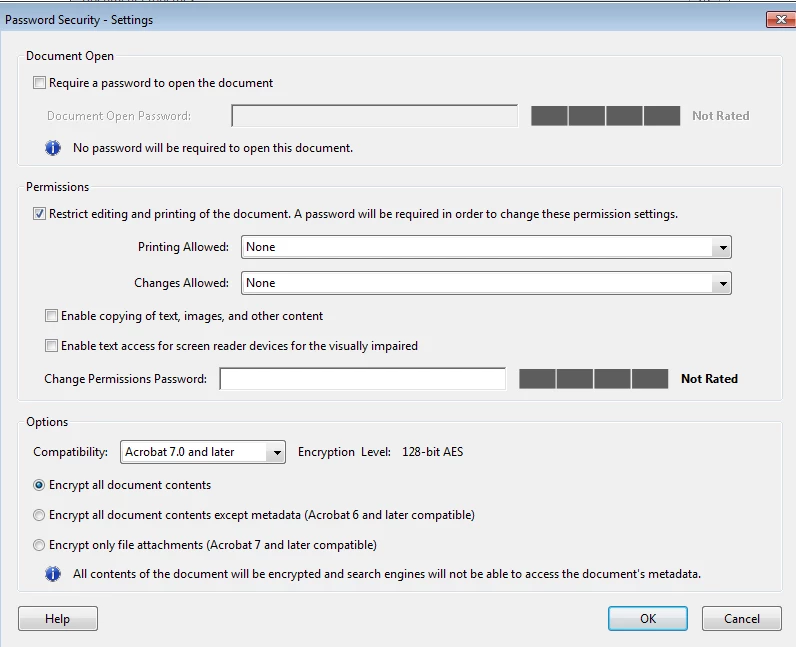
7) Un check all the other boxes.
8) Clcik on "OK" and enter the password.
9) Save the document.
Now, this document can not be converted to word.
Hope this helps!
Thanks,
Tanvi
Already have an account? Login
No account yet? Create an account
Enter your E-mail address. We'll send you an e-mail with instructions to reset your password.


 AdChoices