
LucyPeps
Participant
April 26, 2016
Answered

How to view grid lines? - Adobe Acrobat Reader DC

  • April 26, 2016
  • 2 replies
  • 39728 views

HELP!

Please can someone walk me through how to view the grid lines on a PDF, using Adobe Acrobat Reader DC?

I have recently installed this program, and am aware that there is a way of overlaying a grid onto the documents, but cannot seem to access this feature?

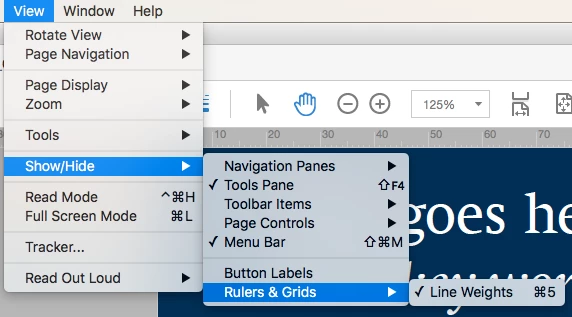
Please see screen shot below of where I think I should be able to access this: View > Show/Hide > Rulers & Grids > Grid?

At the moment, I can only see Line Weights.
NOTE: I am not referring to the transparency grid - I need the grid overlay, to help to measure elements of the document (from a design perspective).

Thank you,
This topic has been closed for replies.
Correct answer Bernd Alheit

It is available in Adobe Acrobat, not Acrobat Reader.

2 replies

LucyPeps
LucyPepsAuthor
Participant
May 16, 2016

I have now downloaded Adobe Acrobat Pro and the grid function works perfectly.

Thank you for your help!

Bernd Alheit
Community Expert
Bernd AlheitCommunity ExpertCorrect answer
Community Expert
April 26, 2016

It is available in Adobe Acrobat, not Acrobat Reader.

kevin_stagg
Known Participant
May 12, 2016

I cannot see the "View" option at all in my version of Adobe Acrobat Pro on Windows 7. I'd tell you the version, but I can't pull down the menu to let you know as I can't view said menu...

This is the menu in question. It has opened a file I created and for the life of me, can't see that button. Any suggestions?

Thanks for all your help in this!

Sincerely -
Kevin

kevin_stagg
Known Participant
May 12, 2016

Nevermind. Figured it out. Because I hadn't saved it first, then reopened it - it wasn't giving me that option. I had just opened the .doc file from within Acrobat.
