
Participant
September 21, 2020
Answered

I can't seem to add another signature to Adobe

  • September 21, 2020
  • 2 replies
  • 5290 views

I can't seem to add another signature to Adobe. PDF acrobat reader. I already have a signature + initials. Additionally, I'd like to add another Signature but that seems to be impossible or not as easy as one should think.
This topic has been closed for replies.
Correct answer AnandSri

Hi!


I hope you are doing well.


Looking at the description given above I believe you are willing to add an additional signature in Adobe Acrobat Reader under Fill & Sign feature.


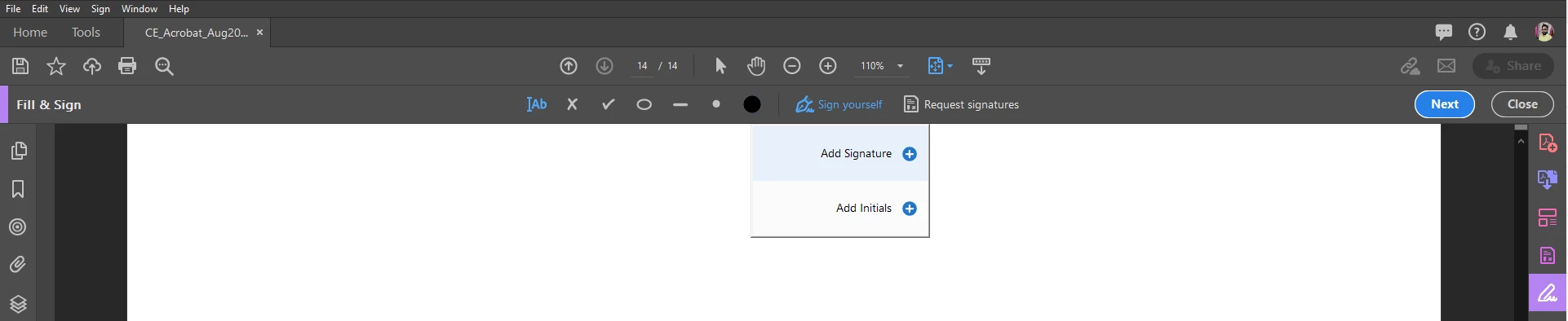
If yes, then there are two options under the Sign menu of Fill & Sign Tool 1- Add Signature 2- Add Initials other than that, there isn't any option of adding an additional signature under Sign.

Here is a screenshot: 


If this is not the case, please do let us know what exactly you are referring to and a couple of screenshots would be very helpful.


Thanks,

Anand Sri.

2 replies

Participant
December 27, 2024

The only work around is creating a stamp.  Go into the Stamp tool, Custom Stamps, Create, browse your computer for the picture of the signature, import, name it
Make sure the signature is cropped.  I experienced problem with formatting and finally got the stamp the right size.
Make sure you have an email from the person whose signature you are using that grants you permission to use the signature, and whether it is unlimited use of the signature because you have a power of attorney, or legal relationship, or for the specific use or your use of a signature is fraudulent, a crime in most jurisdictions.  This is not intended to be legal advice, only a caution to check with an attorney or law enforcement to make sure you are not doing something that can cause you serious problems - or destroy your life - if you acted without that person's written consent each time you use their signature.

AnandSri
Community Manager
AnandSriCommunity ManagerCorrect answer
Community Manager
September 21, 2020

Hi!


I hope you are doing well.


Looking at the description given above I believe you are willing to add an additional signature in Adobe Acrobat Reader under Fill & Sign feature.


If yes, then there are two options under the Sign menu of Fill & Sign Tool 1- Add Signature 2- Add Initials other than that, there isn't any option of adding an additional signature under Sign.

Here is a screenshot: 


If this is not the case, please do let us know what exactly you are referring to and a couple of screenshots would be very helpful.


Thanks,

Anand Sri.

Participant
January 14, 2023

I have the same problem, but I don't see the "Add Signature" or "Add Initial" options besides the existing signature created before.