
Participant
May 8, 2017
Answered

i can't view pdf files in IE11 browser

  • May 8, 2017
  • 1 reply
  • 2745 views

When I want to open any .pdf file in internet explorer

(out of mail or testlink like: https://manuals.info.apple.com/MANUALS/1000/MA1565/en_US/iphone_user_guide.pdf )
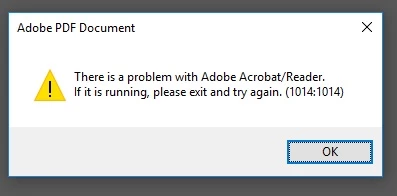
I just keep getting this error.

I did try already:

Browser reinstall / update

Adobe acrobat cleaning tool

Adobe acrobat update

Adobe acrobat reinstall > most recent version

Change settings in the reader about showing in browser.

I can open pdf files on desktop or chrome, no problem.

For my work I need to show them in my browser in Internet explorer.

nothing actually helped. can you guys help me out?

Thank you! 🙂

    This topic has been closed for replies.
    Correct answer soumik011

    Hi,

    Thanks for the information.

    Do you have both Adobe Acrobat and Adobe Acrobat Reader installed, on is it only Reader?

    In any case please un-install both of them and delete the ActiveX component DLLs(if any) from C:\Program Files (x86)\Common Files\Adobe\Reader or C:\Program Files (x86)\Common Files\Adobe\Acrobat.

    Re-install Acrobat/Reader.

    If you are still facing the issue, drop me a mail at soudas@adobe.com. We will take it forward.

    Regards

    Soumik

    1 reply

    soumik011
    Adobe Employee
    Adobe Employee
    May 9, 2017

    Hi,

    Can you help us the version of Acrobat/Reader, IE and the OS you are using? Also do you see the issue in more than one machine with same configuration?

    Regards

    Soumik

    Participant
    May 9, 2017

    Hi,

    First of all thanks for the reply.

    I use the most recent version of the Adobe Acrobat Reader wich i downloaded form the adobe website.

    And also the most updated version of IE11 as you can see in this screenshot.

    I tested this on several devices, only on a few does it works > Magic? because they all have the same imaging,  set-up, versions.

    The only windows i use and from the tested devices is Windows 10.

    Regards

    Dieter

    soumik011
    Adobe Employee
    soumik011Correct answer
    Adobe Employee
    May 10, 2017

    Hi,

    Thanks for the information.

    Do you have both Adobe Acrobat and Adobe Acrobat Reader installed, on is it only Reader?

    In any case please un-install both of them and delete the ActiveX component DLLs(if any) from C:\Program Files (x86)\Common Files\Adobe\Reader or C:\Program Files (x86)\Common Files\Adobe\Acrobat.

    Re-install Acrobat/Reader.

    If you are still facing the issue, drop me a mail at soudas@adobe.com. We will take it forward.

    Regards

    Soumik