This topic has been closed for replies.

2 replies

Zaid Al Hilali
Community Expert
Community Expert
August 5, 2022

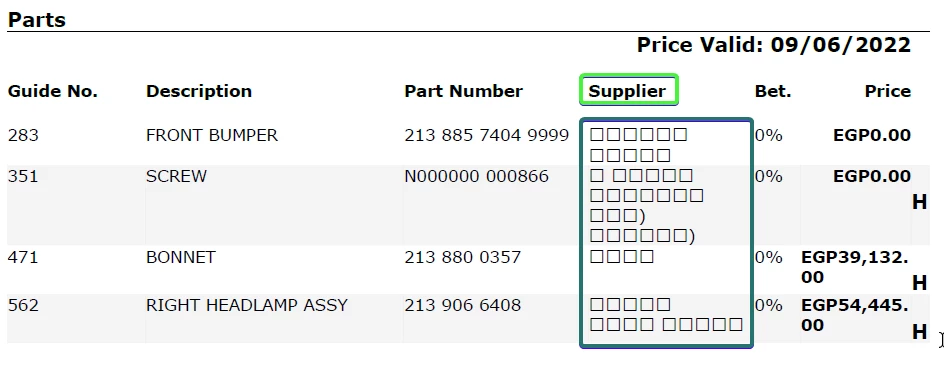
Adobe Reader and Acrobat Pro/Standard supports Arabic well. The PDF you opened didn't embed the Arabic font as the PDF apparently was not prepared properly.

When this PDF is opened on any computer that has the "missing font" installed already on that machine, then the all Arabic names will show as expected.

AkanchhaS8194121
Legend
July 19, 2022

Hi Samerr,


Hope you are doing good.


If you're trying to fill a PDF form using Adobe Fill & Sign, then this feature doesn't support Arabic yet.


If, however, you're trying to fill a standard PDF form with existing interactive or fillable form fields, then this supports Arabic well and should work on Mac and Windows as long as your computer has the Arabic Language installed.

You may shed more light on which option or feature you're using to fill up the document with Arabic text so we can help you better. 


Note: There is no such thing as a language pack in Acrobat Reader/Pro/Standard that you can install to make it support Arabic.


Thanks,

Akanchha 

samerr17414008
Known Participant
July 20, 2022

My friend sent me this pdf report asking me to check why there are squares instead of names.

I tested this PDF file on several computers supporting difference languages but the result is the same.

I asked my friend about the source of this PDF file. He says they are using an application called Audatex and the system generate pdf report once they press submit.