
Participant
May 26, 2023
Answered

Icons do not appear for PDFs

  • May 26, 2023
  • 1 reply
  • 1277 views

Oi pessoal se alguém puder me ajudar nesse problema que esta me enlouquecendo.


O icone vermelho do PDF não aparece mais nos meus arquivos quando estão no modo de exibição lista, procurando emvarios foruns me indicação usar o modo miniatura, que aparece a capa. Mas não é isso que eu quero. Gosto e preciso que o modo de exibição estaja junto com a data da ultima modificação ou do donwload.


Aguem já teveum problema parecido e/ou pode me ajudar?


Segue a foto de como está com uma capinha branca, ao invés da logo do adobe.
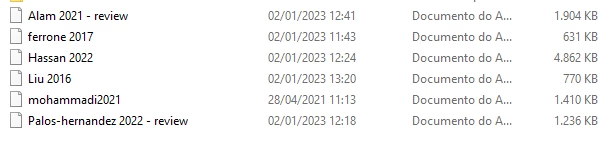


Obrigada!

This topic has been closed for replies.
Correct answer Meenakshi_Negi

Hi Fernanda30085984jjcr,


Thank you for reaching out.


Please check the default application selected for PDF on your desktop. If Acrobat is not the default application, the Adobe logo will not appear. 

Refer to the following help document: https://helpx.adobe.com/acrobat/kb/not-default-pdf-owner-windows10.html

If that is not the case, try reinstalling the application using the following steps:
-Remove the application and run the cleaner tool (https://www.adobe.com/devnet-docs/acrobatetk/tools/Labs/cleaner.html).
-Reboot the machine
-Install Adobe Acrobat Reader from the following page: https://get.adobe.com/reader/enterprise/.


Let us know how it goes.


Thanks,

Meenakshi

1 reply

Meenakshi_Negi
Meenakshi_NegiCorrect answer
Legend
May 26, 2023

Hi Fernanda30085984jjcr,


Thank you for reaching out.


Please check the default application selected for PDF on your desktop. If Acrobat is not the default application, the Adobe logo will not appear. 

Refer to the following help document: https://helpx.adobe.com/acrobat/kb/not-default-pdf-owner-windows10.html

If that is not the case, try reinstalling the application using the following steps:
-Remove the application and run the cleaner tool (https://www.adobe.com/devnet-docs/acrobatetk/tools/Labs/cleaner.html).
-Reboot the machine
-Install Adobe Acrobat Reader from the following page: https://get.adobe.com/reader/enterprise/.


Let us know how it goes.


Thanks,

Meenakshi

Participant
May 26, 2023

Thank you for your tip, Meenakshi!


It worked out


Meenakshi_Negi
Legend
June 5, 2023

Hi Fernanda30085984jjcr,


Glad to know it helped. Thank you for confirming.

Let us know if we can be of any further help.


Thanks,

Meenakshi