
Answered
Importing .xfdf does not work in Reader, whereas it works perfectly in Acrobat Pro
Hi,
I have written a script in Acrobat Pro that automatically imports a .xfdf file to fill in a form. It works perfectly when I open the form in Acrobat Pro.
Here is the script:
function importXFDF()
{
var url = "C:/Users/maarmstrong/Documents/AcrobatStuff/file.xfdf";
this.importAnXFDF(url);
}
importXFDF();
However, when I try open this form in Adobe Reader, it gives the following two pop-up boxes:
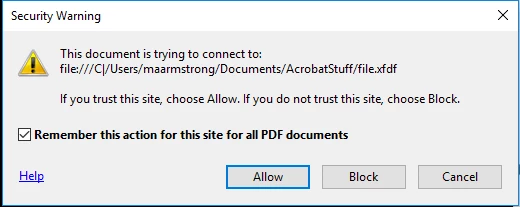
The box above makes sense, just click "Allow". However, the file path looks strange to me, as if it's not pointing to the right location.
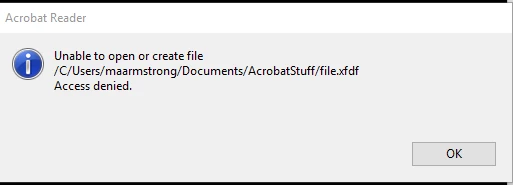
Again, the location looks odd. It should look like: C:/Users/maarmstrong/Documents/AcrobatStuff/file.xfdf
I am unsure why this is happening.
Any help will be greatly appreciated.
 AdChoices