Answered
Impossible to move stamp on Adobe DC viewer in IE11
Hello
I can't move a stamp on a document when I preview it.
I have the "cross" "move" on the stamp but i can't move it.
Do you have an idea to resolve this problem ?
Thanks a lot,
EM

Hello
I can't move a stamp on a document when I preview it.
I have the "cross" "move" on the stamp but i can't move it.
Do you have an idea to resolve this problem ?
Thanks a lot,
EM
Hello Emilienm,
We're sorry for the trouble you had while moving the stamp in a PDF. With 'Preview' are you referring to the Print Preview and trying to move the stamp in it?
Open the PDF in Adobe Reader and try moving the Stamp. Also, open the 'Stamp Properties' and check if the "Locked" option is not selected. If it is selected, uncheck the box.
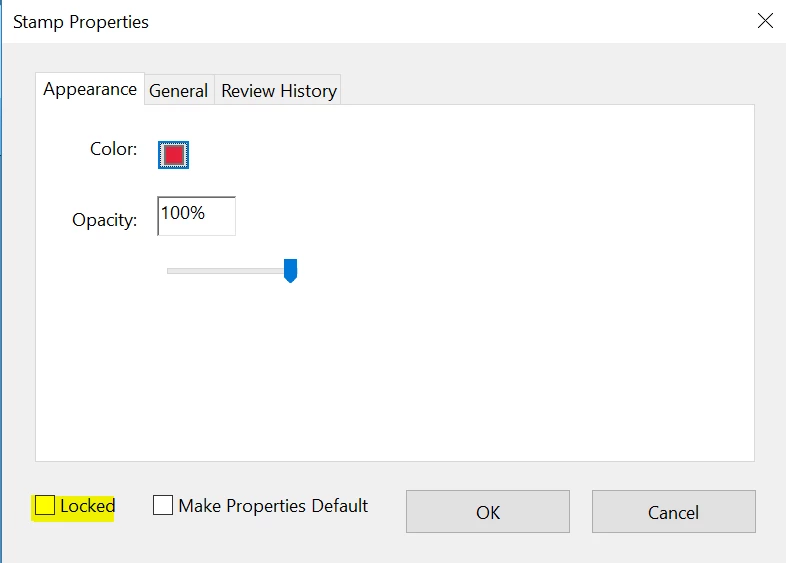
Have you tried with other PDF file or the issue is specific to one PDF? Make sure that you have the latest version of Adobe Reader installed, check for any pending updates from help>check for updates, reboot the machine after updating Adobe Reader.
Is it possible to share a screenshot? To share a screenshot of the error/issue, refer to https://forums.adobe.com/docs/DOC-7043#jive_content_id_How_do_I_attach_a_screenshot
What is the dot version of Adobe Reader installed? To identify refer to Identify the product and its version for Acrobat and Reader DC
What is the version of OS installed?
Let us know how it goes and share your observation.
Thanks,
Anand Sri.
Already have an account? Login
No account yet? Create an account
Enter your E-mail address. We'll send you an e-mail with instructions to reset your password.


 AdChoices