Participating Frequently
September 17, 2021
Question

Impossible to send mail from Adobe Reader DC

  • September 17, 2021
  • 8 replies
  • 8867 views

Hello,

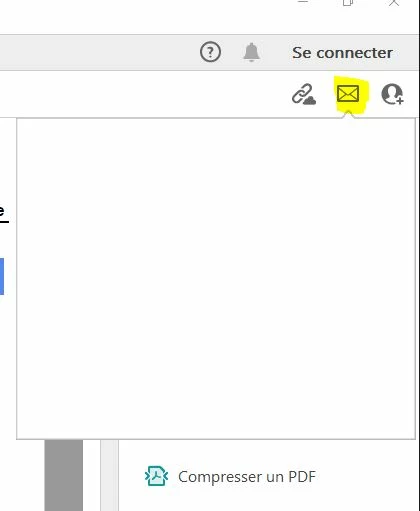
Since the last update, it's impossible to send email from Adobe Reader DC via Outlook 2019. We have a blank screen when we click to send mail.

See the capture


Help me please.
 

This topic has been closed for replies.

8 replies

Participant
December 13, 2021

I had the same issue with the Adobe Acrobat DC on a PC of one of our users. Tried several things, until I bumped into the following known issue on site of Adobe: "Send Mail. Problem: Not able to use Outlook's other windows while outlook Draft message window is active (launched through Send File as attachment).[3829341]".


So, I closed a draft message in Outlook and ... bingo ... send via email worked in Acrobat!

netordre.dk
Participant
November 18, 2021

Is there a solution on this issue? - we're haivng alot of users with this issue.
Have tried multiple things, but nothing a probally working for us. Such as, reinstallation Adobe, checking for missing updates, disable cloud savings and installed 64-bit instead of 32-bit.

All computers are fully updated to 21h1. It worked for a while, when we installed the 64-bit version, but stopped again...


This is very unstable, and we hope that there will be a fix soon.


SI0D4BAuthor
Participating Frequently
November 19, 2021

Hello,
We also still have problems with sending it by email and saving it as (white screen). 32bits and 64bits version.

user45908745093485735
Participating Frequently
September 29, 2021

definitely fixed by installing the 64bit version of Adobe Reader


thanks to Adobe team for support

Participant
September 22, 2021

We ave having this issue at my company as well. Multiple people across multiple departments! Also this same blank bug is happening when the user trires to save as the pdf also!

Participant
September 21, 2021

My whole network of 50 computers has this exact same problem after the latest windows 10 pro updates.


Fixed (only on some more urgent PCs) by installing an old version of adobe reader (2019).

user45908745093485735
Participating Frequently
September 21, 2021

I was able to definitively solve it like this (for now):


The procedure is:
- correct the adobe installation
- disable cloud saving
- restart the pc

It seems to work

Participant
September 22, 2021

Can you tell me how you disabled cloud saving? Ive been googling it for an hour and havent found anything useful and cant find the settings that are mentioned. 

Thank you

user45908745093485735
Participating Frequently
September 22, 2021

Edit -> Preferences -> General -> Show Online Storage When Saving Files

user45908745093485735
Participating Frequently
September 17, 2021

My whole network of 50 computers has this exact same problem after the latest windows 10 pro updates.


Fixed (only on some more urgent PCs) by installing an old version of adobe reader (2019).

AmbooS
Adobe Employee
Adobe Employee
September 21, 2021

Hello,


We apologize for the inconvenience caused to you and we are actively investigating the issue you have started facing with the latest Acrobat update.

Would like some more information from you -

1- Do you see blank view when you click on Home->My Computer or Home->Document Cloud also? 

2- Could you please check what is the folder path shown in "CEF_DIR" key at the following registry -
(if you have Adobe Reader) HKEY_LOCAL_MACHINE\SOFTWARE\WOW6432Node\Adobe\Acrobat Reader\DC\Installer or
(if you have Adobe Acrobat) HKEY_LOCAL_MACHINE\SOFTWARE\WOW6432Node\Adobe\Adobe Acrobat\DC\Installer?

and if that folder path actually exists on your machine?


To check the above registry, please go to Start->type "regedit" and press <ENTER> key. This will open registry editor. 


Thanks for your patience,
-amboo

SI0D4BAuthor
Participating Frequently
September 21, 2021

Hello,

1- No Blank view

2-the path shown in "CEF_DIR" is "C:\Program Files (x86)\Adobe\Acrobat Reader DC\Reader\acrocef_32" for Adobe Reader

Meenakshi Negi
Community Manager
Community Manager
September 17, 2021

Hello,


Thank you for reaching out and sorry for the trouble.


Please try relacunhing the application and machine.

Could you please confirm the Reader DC version installed on the machine?

Are you using the application on Windows or Mac? Please share th OS version.


Thanks,

Meenakshi


SI0D4BAuthor
Participating Frequently
September 17, 2021

Hello,


Thank you for your reply.

Relaunching the application or the machine is not enough to solve the problem.


Adobe Acrobat Reader DC version: 2021.007.20091.
OS versions: Windows 10 Pro 21H1 and Windows Server 2016 Datacenter 1607 (RDS sessions).
